

Video streaming platforms like YouTube, Netflix, Twitch, Hulu, etc. have become popular these days. The new behavior of viewing movies, series, and online shows is becoming a more virtual one. Consequently, it's no wonder that people are witnessing smartphone and internet invasions globally. Movies have become a possibility even on the go. Would this tendency fade or progress further? Of course, there’s always room for progress. You can consider:
- initiating a video streaming business
- developing a live video streaming website
- adding innovative movie streaming features
- achieving great product monetization results
- gaining plenty of website users and viewers
And we'll help you to build a video streaming website that will meet all these expectations. Our experts are going to answer all the details about developing a live video streaming website. So, keep on reading!



- Why should You Build a Video Streaming Website?
- Our Expert Advice on How to Create a Video Streaming Site
- Define your business idea and choose a niche
- Create a business plan roadmap
- Choose the software development models of monetization
- Think about specific licensing and security
- Hire a software development team
- Set up the platform’s key features
- Work on a seamless UI/UX design
- Market and promote your website
- Test the platform and analyze the feedback
- Video Streaming Website Features You should Know about
- Registration and subscription plan
- Personal information management
- Search
- Integrated payment system
- Content management system
- Home page
- Recommendations
- High-quality resolution
- Video download
- Feedback page
- Personalization
- Localization
- Tech Stack for Video Streaming Website
- Video Streaming Website Monetization Strategy
- Subscription
- Rent a film
- Advertising
- Inoxoft’s Experience in Developing a Live Video Streaming Website
- Consider Inoxoft Your Trusted Partner
- Final Thoughts
Why should You Build a Video Streaming Website?
Video streaming is a perspective and beneficial business to engage in. Grand View Research reports that last year the size of the video streaming market from 2023 to 2030 will expand at a CAGR of 21.5% counting up to $223.98 billion.
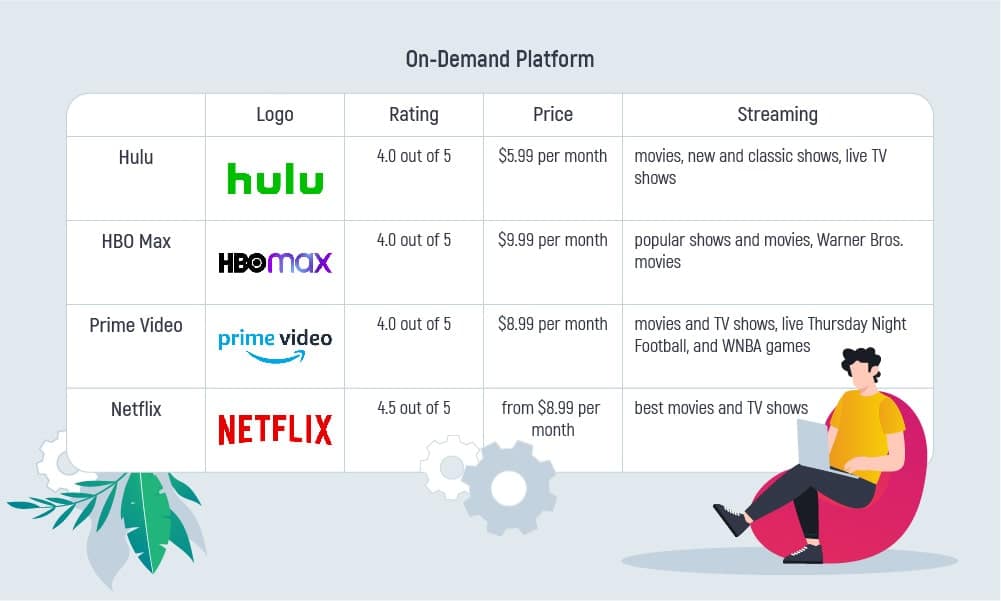
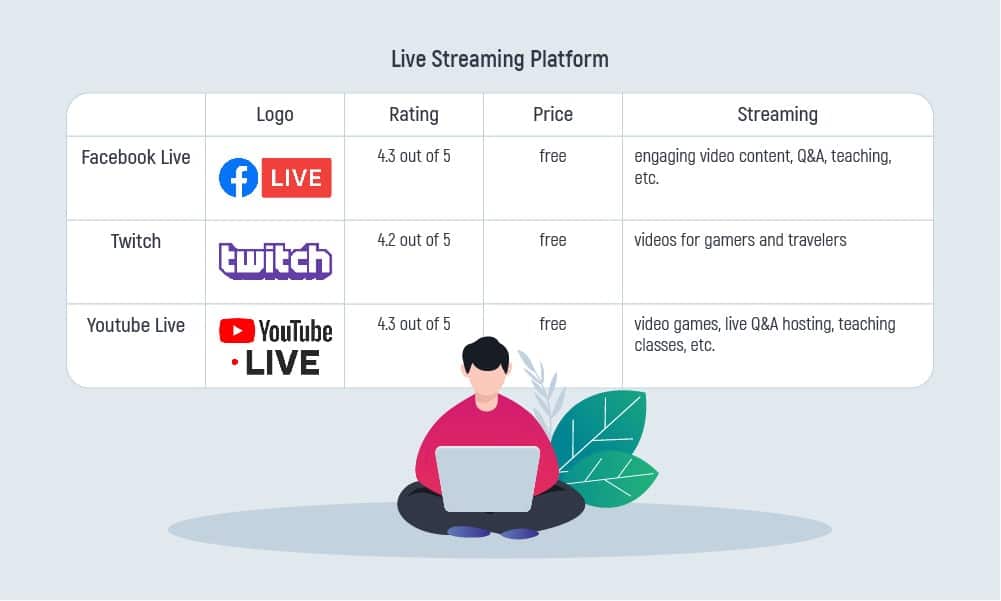
PC Mag listed a few best video streaming services in 2023. These video streaming platforms are either on-demand video streaming or live video streaming. The on-demand videos are stored on the video streaming server. You can access them 24/7. The live-streaming video content has a live broadcast and you can access it only at a specific time. The biggest on-demand streamers are Hulu, HBO Max, Prime Video, Netflix. The most known live broadcasters are Facebook Live, Twitch, and YouTube Live.
Discover some of the best features of streaming platform!
Our Expert Advice on How to Create a Video Streaming Site
How to create a video streaming website? Before going into the development stage, you can try out discovery phase services. The goal of the discovery services is to get a consultation on the business idea you have. And, an opportunity to understand whether your idea is successful or needs improvements. Another way to reduce risks, and cost wasting, and justify the efforts is to design an MVP. A minimum viable product is a project with a limited set of features and functionality. But, it will still be a website for end-users to use, test, and give feedback on the way they feel about your product. So, how to how to make a movie site?
Consider the following 9 steps to build a video streaming website:
Define your business idea and choose a niche
There are many video streaming platforms on the market and creating a copy wouldn’t be practical. Before engaging in development, it would be wise to choose the perfect niche first. What kind of content would you like to stream? And, as a second step, the video website should include innovative functionality. There are features that users are asking for and it’s your chance to execute them.
Create a business plan roadmap
With the help of the logical business roadmap, you will be able to stick to the predicted growth scheme. A plan to follow is like a blueprint your business should consider focusing on. What would you get out of a plan? A clear and defined itinerary with set goals to achieve and a direction to pursue. Excellent Businessplans.com states that 30% of evolution and success is due to a pre-plan.
Choose the software development models of monetization
Product and services delivery ground on generating income. This is also a point to take into account. You should figure out how to earn money the right way and choose a monetization model to meet your needs. See also our guide to software development models.


Think about specific licensing and security
To broadcast video content you need legal permission to use copyrighted material. Protecting Lawful Streaming Act describes concrete cases of illegal streaming. Here, every video belongs to intellectual property. Department of Justice can bring felony charges against anyone providing illegal streaming services.
The security issue is also important. For even with a legal permit to stream movies, you need to encrypt this path. To ensure media content is safe on your platform, you should consider using DASH and HLS streams. See more about DASH and HLS streaming by following the links.
Hire a software development team
Your team has to have the same vision of your final product as you have. The value input into the website, current trends, beliefs, and legal compliance issues are to be discussed in detail. Software engineers can impact the future course of your video streaming platform. Furthermore, if you are on the same page with your development team it is more likely that your expectations are met 100%. Valuable insights on how to hire developers for a startup can be found in the link.
Set up the platform’s key features
What type of video users are you targeting? Is the platform designed for video creators or video consumers? Or, it is an admin panel? These user roles need different approaches and core functionality to build the platform. Think about your goals and set up the user role to deploy.
Work on a seamless UI/UX design
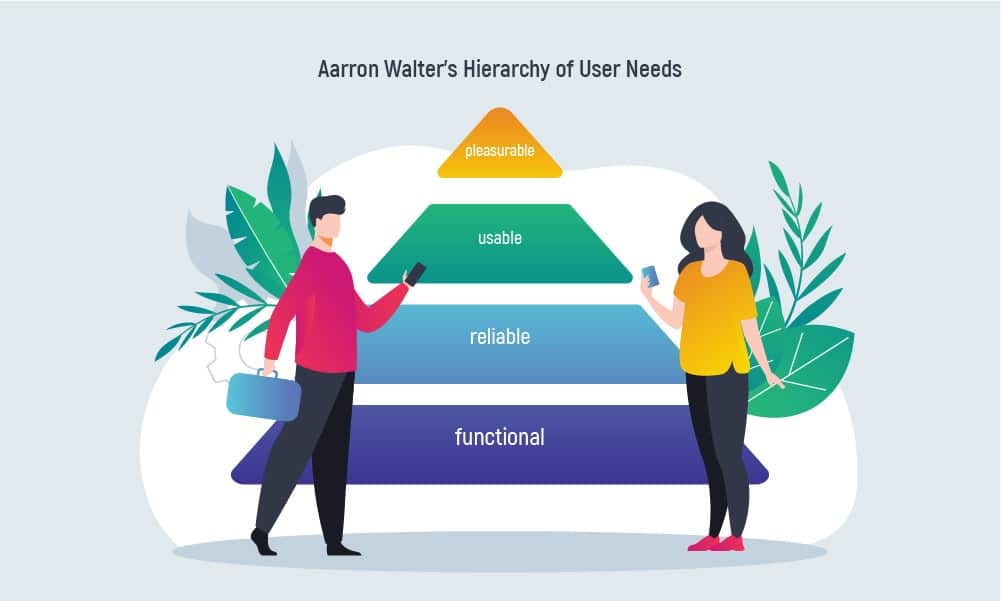
Users are picky when it comes to design. The hierarchy of needs by Aarron Walter shows that UI/UX aims to be functional, reliable, usable, and pleasurable. Features and colors that will please the eye and seamless functionality will get user attention. That’s what users will search for in your video streaming platform. Therefore, never underestimate the impact of design on software development! Click here to read the article.
Market and promote your website
Marketing and promotion of the video streaming platform should cover a great deal of the software pre-launch stage. Why? A good marketing campaign can make your website popular. There are different channels you can use to promote your product. For example, these might be:
- SEO
- SMM
- Social media advertising
- Paid target advertising
- Content marketing
Whatever method you choose, the advantages are obvious. Read more about how open-source software make money to get more insights.
Test the platform and analyze the feedback
Website performance testing before launch should be initiated together with the development stage. Start testing early and get to fix all the problems beforehand. Additionally, ensure the platform works fine, is stable, loads videos fast, functions well, and meets your expectations. Read more about the Importance of Conducting Performance Testing.
Read more: Node.js for streaming web platform
Video Streaming Website Features You should Know about
How to create a video streaming site? There are two types of features each site should have: Basic features and Advanced features.
How to build a video streaming platform with basic features? These features should include:
Registration and subscription plan
A video streaming website cannot be open-source as it contains copyright material. For this reason, the site should ask for obligatory registration. And, also, for a subscription to a certain monthly payment plan. Furthermore, after the process of registration, each person gets a newly created user account and has to carry out subscription payments according to the chosen plan.
Personal information management
In an account, users should be able to change their basic information. For example,
- an email address or
- a phone number (if applicable)
- name and address
- passwords
All these factors will be appreciated, so they should exist for end-user convenience. Besides, it would be great if users could have access to personal:
- viewing history
- favorites
- playlists
- updates
Being able to change something and have a preview is a benefit for your platform. Plus, end-users will be satisfied with the information management option for sure.
Search
The plenty of video content can be quite overwhelming for users, who would like to find a film to watch at once. Here, you should focus on making some filters for users to choose films more easily. The filters help in the differentiation between action movies or dramas, movie years, favorite actors starring, etc. With the help of keyword or filter searches, users will be able to find the movies they were looking for in no time. A search engine can save users a great deal of time and add one more point to user satisfaction.
Integrated payment system
There are two types of payment systems you can choose from. It’s either a custom-developed payment system or one belonging to third-party services. The first requires extra costs and testing, while the latter should be chosen concerning security. For instance, you can choose to integrate Stripe or PayPal. Of course, there are others. Each of these payment systems charges in a similar way, but the locations they support differ. Some of the famous streaming platforms support debit or credit card payments with Visa, Mastercard, and American Express via such services as Apple Pay, Google Pay, Amazon, and more. To understand what are the benefits of custom software development, follow the link.
Content management system
A video streaming platform has several functions to cover. Thus, you should prioritize, who will
- upload videos
- organize (group) videos
- manage user accounts
- track payments
- provide statistical analyses
For better cooperation, these tasks should be carried out by different people. So, make some restrictions if possible. This way, you will receive a better picture of how your platform is doing.
Home page
A homepage is considered to be the face of the whole platform. Its first impression impacts user satisfaction with the platform almost immediately. If the home page is functional and user-friendly, then it should not be packed with movies. The films should be organized in groups under a specific name, e.g. “Trending”, “New of 2021”, “Oscar-winning”, “Most searched”, etc.
What’s more, the design of the homepage should be intuitive. Users, who are new to the platform, should always feel at ease. Their acquaintance with the video streaming system should be no more than a few minutes. The trickier the homepage is, the more chances it will irritate your users and make them abandon your service.

How to create a streaming website with advanced features? These may include, but are not limited to:
Recommendations
ML, NLP, predictive, and data analytics technologies have appeared to be quite progressive these days. Users enjoy recommendations of films based on the ones they’ve watched or on favorite genres. Who wouldn’t want to get a selection of films to watch? Thus, this feature might give your platform a big plus among competitor websites.
High-quality resolution
Today, video quality has been given extra credit. Naturally, users, who cannot view videos in Full HD and 4k quality will be dissatisfied with any streaming service they pay for. Hence, high resolution is an important aspect that adds to an increase in screen time. Moreover, in a video streaming platform that wants to be competitive, this is a must-have feature. For this reason, developers use different protocols. Some of them were mentioned above. The protocols are important both for high-quality streaming and security. These are:
- HLS (HTTP live streaming protocol)
The protocol allows the fastest streaming possible on the market. It supports only iOS devices and should be used in iOS development.
- DASH stream
An AI technology that downloads fragments from playback to avoid buffering. Allowing to scroll backward or forward a bit this streaming makes the user experience a pleasant journey.
- RTMP (real-time messaging protocol)
It is a protocol of low latency used in live streaming. The protocol is supported worldwide.
Video download
One of the best advantages you can give to your users is to make video downloading available. For example, if there is a poor internet connection, the option to download a movie will be so important. Still, don’t forget to consider copyright protection policy adherence. Most of the users would not distribute movies from their devices further, but you should be on the safe side.
Feedback page
It is an optional feature but it is quite outstanding for users. Such video streaming platforms as Hulu have a community page. Here, viewers can share thoughts, ask questions and leave feedback on movies. Communication has always been an advantage for any user. And, being able to discuss a film or how your platform works will make users give you extra credit.
Also, this page might help gather analytics. For example, together with user feedback, algorithms involved will show you what your users prefer watching. Having these insights on your sleeve will allow purchasing movies more carefully. You will save money on movies that won’t be a success among viewers. And you will gain more user trust and score more as your movie suggestions will hit the target.
Personalization
Personalization of a platform has always been a priority for users. For instance, the ability to have family profiles with each member viewing his/her content. Or, the ability to view movies from your account on five different devices. It would have been specifically convenient to share subscriptions these ways. Thus, the best feature would be that people involved would still watch movies independently from each other.
Localization
Naturally, most video streaming platform users tend to buy movies and TV series in their native languages. Statista says that the most spoken languages worldwide are English and Chinese. See the chart below. Despite the two common languages, small groups of speakers would still want to watch a movie in their native languages. Furthermore, to be popular worldwide, you should think about movie subtitles and dubbed movie versions into several languages. The more languages you will cover, the more platform community you will get.
Tech Stack for Video Streaming Website
There is no common tech stack for a video streaming platform. There are programming languages you can use and the recommended technologies. For example, you can use JavaScript on the frontend and Java, Python, C# on the backend. You can also use JS-based frameworks like Node.js. Or some of the JS libraries like React. For API and SDK, you might think about Amazon Web Services. You can use a MySQL database or Oracle. For cloud hosting and cloud storage, you can use Amazon EC2 and Amazon S3, respectively.
Mainly, the choice of technology is based on the creation of the movie streaming logic and flawless functionality. For the best tech selection, it is recommended to consult a custom web development and a UI/UX development company. You can find the best countries to outsource your development by clicking the link. Here, you will receive the best advice based on your particular needs and requirements.

Video Streaming Website Monetization Strategy
Monetization of the video streaming platform should be done through such means as:
- Subscription
- Rent a Film
- Advertising
Subscription
Subscription is the strategy most used in video streaming website monetization. For instance, Hulu charges $5.99, HBO Max takes $9.99, Prime Video has a threshold of $8.99, and Netflix has a fee of $8.99. In this case, the payments given are per one month. What’s more, all these subscriptions are minimal and correspond to the minimum features available on the platform.
Rent a film
If users are not willing to subscribe every month, they can always choose to rent a film per one-time view. For example, as it is possible in Google Play Movies. Here, the cost is pretty satisfying and you can also buy the film and place it in your library to watch later. However, the price per purchase will be higher than per rent.
Another perfect way to satisfy your users is to allow them to buy a basic subscription and also to make it possible to buy movies they would like to watch or rent these films for some time. Hence, users can subscribe to a plan that will meet their needs so that they won’t have to pay for everything at once.
Advertising
Advertising is one of the means that can bring you profit as well. For instance, you can place an ad within a movie at any moment of its streaming. However, do not overdo it! The audience will tolerate one-two ads that will not interfere with watching the movie, but three or more ads will distract and irritate it.
Anyhow, it is up to you to choose the monetization model that fits your beliefs and matches the revenue you’d like to receive.
Inoxoft’s Experience in Developing a Live Video Streaming Website
All in all, how to build a video streaming website? Inoxoft has vast experience and knowledge of how to create a live-streaming website. For example, our team has created a video-sharing solution for social media, which:
- gives users a helpful start with easy and emotionally rich video communication
- notifies users about happy moments in a digital way
- delivers social networking app for Android and iOS with smooth UI/UX, quality video integrations
- has a possibility to invite people from contact lists
- adds design features to update the product’s entertainment and educational functionality
Also, It is unique and innovative due to being:
- the 1st streaming platform for women and about women
- female-led with a large movie database
- top-quality streaming movie service
- LNS and DASH transmission supported
- adapted for mobile users
- user-oriented with the ability to invite friends to watch movies together online
The cost of these video-streaming solutions highly depends on the clients’ requirements as well as common and extra features they would like to have in the type of website. If you’d like to get a more precise estimate, you can always contact us or view our app cost calculator here. Nevertheless, both methods are fine as long as you get the approximate app cost and an app maintenance cost right away.
The difference in video streaming platform cost on different markets depends mostly on the vendor, who will create a video streaming website, your budget and time, copyright policy, technologies to use, and so on.
Consider Inoxoft Your Trusted Partner
Inoxoft is a custom web development and UI/UX development company that can implement your wildest ideas into being. Our certified engineers turn web applications into powerful tools meeting clients’ requirements and fulfilling the expectations of end-users.
As a custom web development company, Inoxoft changes the business potential by implementing web app ideas and enabling the apps’ strong competitiveness in the market. Thus, we can become your most open and reliable partner there is. Our delivery services focus on amazing software quality combined with business analytics, sophisticated code, and user-oriented seamless custom web design.
Therefore, if you’re thinking “How to make my video streaming website?”, choose Inoxoft as your app-building partner. We will develop a video streaming website that is highly functional, innovative on the market, user-friendly, and even more. Contact us to discuss details!
Final Thoughts
Today, video streaming is a sought-after entertainment. Some different websites and platforms offer watching movies for a certain fee per month. Each of these platforms is unique and gathers an enormous movie database, which allows watching movies anytime. If you’re wondering how to create a streaming service? or how to make a live-streaming website? – this article is key to start the development phase.
If you have a perfect video streaming solution that has not been implemented yet – don’t waste your chance to become successful right this moment. Take your chances and our brilliant minds to implement a strong competitive website that will gather user satisfaction.
Frequently Asked Questions
How to make a video streaming website?
Mainly, there are 9 simple steps we discuss in the article. These are:
- Define your business idea and choose a niche
- Create a business plan roadmap
- Choose the software development models of monetization
- Think about specific licensing and security
- Hire a software development team
- Set up the platform’s key features
- Work on a seamless UI/UX design
- Market and promote your website
- Test the platform and analyze feedback
What experience do you have in developing a live video streaming website?
Inoxoft has vast experience and knowledge of how to create a streaming website. Our team has created a live video-sharing solution for social media, and also we have deployed the first women-led movie streaming platform, which is an on-demand one.
Which features are needed to develop a video streaming website of your own?
There are two types of features each platform should have: Basic features and Advanced features.
Basic features should include:
- Registration and Subscription Plan
- Personal Information Management
- Search
- Integrated Payment System
- Content Management System
- Home Page
Advanced features may include, but are not limited to:
- Recommendations
- High-Quality Resolution
- Video Download
- Feedback Page
- Personalization
- Localization