

2020 became a determinant year. It has changed the approach to things and how people organize time and resources. Along with COVID-19, it brought new possibilities, working, and learning solutions to the educational sector. In 2023, students have an option not to leave their homes to attend lessons: the online learning environment became natural quickly
In a world of virtual communication, traveling, and shopping, now there is a virtual classroom where it’s possible to study just as effectively as you do offline. Total digitalization requires new skills to keep up-to-date and familiarize with EdTech tools. Each year e-learning market keeps growing, making more and more people engaged in online education.
Online education app development is relevant due to the increasing popularity of e-learning. Our task is to discover more about its conveniences, benefits, and peculiarities. E-learning apps are the thing that eases our lives when everything is functioning remotely. With their help, it’s easy to save our costs and time and still get the quality education you need. Learning more about the subject is necessary to get the best of the new possibilities.
This guide will tell you everything you need to know about e-learning app development and the benefits of mobile e-learning apps. We will share the expertise of Inoxoft in educational and e-learning software development to demonstrate how the next-generation learning management systems and school management solutions facilitate and streamline learning. Now, let’s get into it!



- Should You Invest in E-Learning Mobile App Development
- Main Benefits of E-learning Mobile Apps
- Main benefits for students
- Main benefits for teachers
- Types of E-Learning Apps
- Learning Management Systems (LMS)
- Massive Open Online Courses (MOOCs)
- Language Learning Apps
- Schooling Apps
- Tutoring Apps
- Skill-Based Learning and Professional Development Apps
- E-Learning Apps for Pre-K
- Essential Features of an E-Learning Mobile App
- Registration and login
- Push notifications
- Support of multiple languages
- Assessments and quizzes
- Tips and How-To screens
- How to Develop an Educational App
- Define your goal
- Conduct Market Research
- Assemble Your App's Structure and Features
- Design The User Interface (UI)
- Develop Your App
- Test and Iterate
- Launch and Update
- The Cost of E-learning Development
- Questions to Contractors about the App Development Process
- Consider Inoxoft Your Trusted E-learning App Development Partner
- Final Thoughts
E-learning App Development Market
E-learning apps are online tools for studying that are available on any smartphone. Now the number of users of these applications is only increasing, and the process of online learning application development is still unfolding. The most well-known e-learning apps are Coursera, Udemy, Skillshare, and LinkedIn Learning.
These apps can help you dive into any topic you are interested in, like design, programming, technology, art, banking, and marketing, and it’s not even the complete list. We can witness the e-learning market growing each day. Its size surpassed $315 billion in 2021 and is expected to grow at a 20% CAGR from 2023 to 2028.

The graph above demonstrates the changing e-learning market size since 2019 (pre-COVID-19 time) and till 2025. The tendency shows that it’s going upward, as it is predicted that by 2025 education will be even more digitalized. The primary target audience of e-learning is young people obtaining secondary and higher education. Moreover, they usually tend to study with the help of online education apps. You can see statistics on the graph below 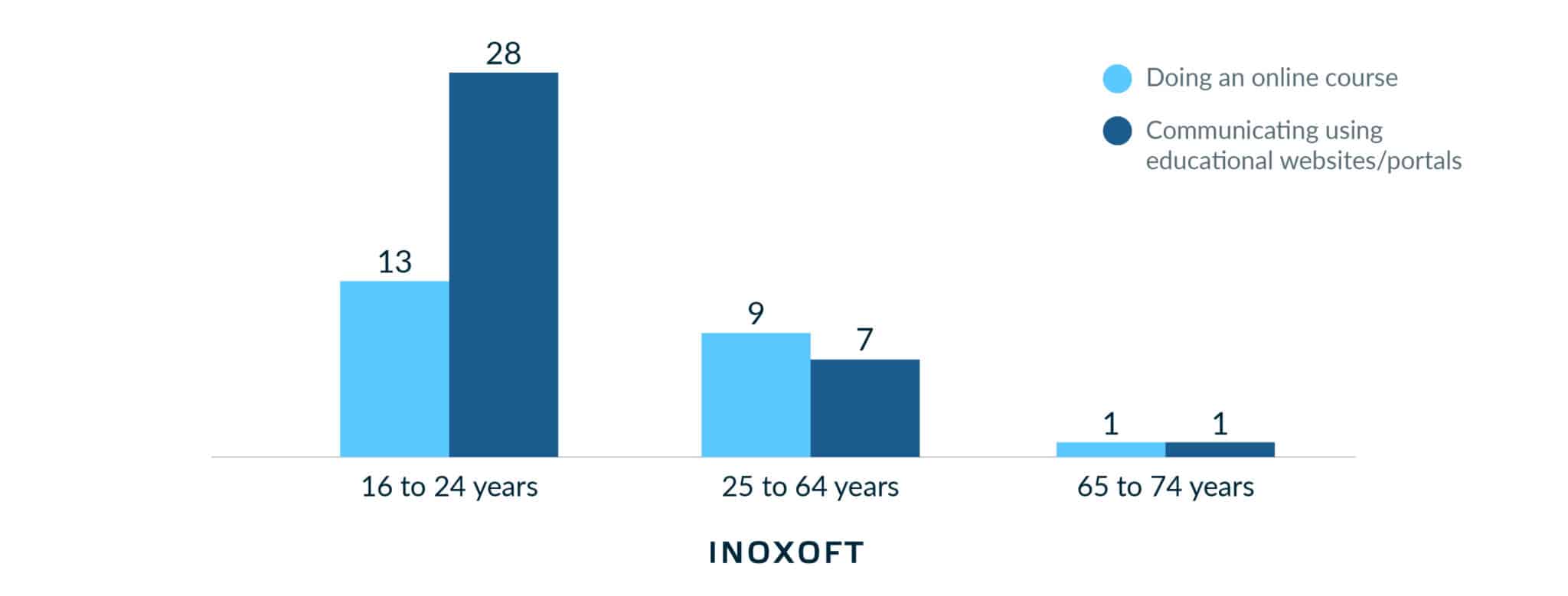
What is the difference between e-learning apps and traditional educational programs? Well, it’s not a secret that the young generation is a moving force of change, that’s why everything oriented toward this age category becomes the most effective, refined, and relevant.
Unlike traditional learning programs, e-learning apps constantly update, provide new information and progressively get easier to work with. The main benefit is efficiency and an innovative, fun form of learning, making the process more rewarding and engaging for students.
Should You Invest in E-Learning Mobile App Development
Nowadays, investments in e-learning application development are a great way to start your own project. The world is evolving, and the digital market is getting wider. The statistics say that education is the third most popular category on App Store and even higher on Google Play. The more educational apps appear, the better!
If you have fresh ideas and a desire to create something useful for people, you should try yourself and invest in e-learning mobile app development. The main ways to make money investing in educational apps are buying, subscribing, and advertising. Paid subscriptions are a stable way to engage numerous users. Advertising should not dominate in the app, but it’s also beneficial to you.
Speaking of the popularity of e-learning apps, it’s pretty clear that they are at the top now. In our post-COVID world, they are no longer an option but often a requirement. If you catch the wave and invest in this sphere, you will only increase your income, as the business is developing non-stop
Main Benefits of E-learning Mobile Apps


So, why does e-learning deserve our attention? Of course, it’s innovative and future-proof, but can it substitute traditional education methods? Those who tried e-learning can genuinely feel the drastic difference and agree that EdTech made their life much easier. Here are some reasons to dive deeper into online education.
- Flexibility. First of all, e-learning programs are flexible and mobile. It allows students to organize their time and choose the most suitable pace. Furthermore, students can control their daily schedule, and, thus, become more efficient.
- Quick and easy access to information. There is no need to spend hours looking for important details anymore. All the sources are accumulated in the app, which provides the student or teacher with necessary sources and cognitive content.
- Affordability. Some students don’t have enough money to get the education they want. There is nothing simpler than getting knowledge with the help of an e-learning app.
- Diverse learning. The apps are full of content that is helpful in your studies and interesting to explore. You can make your learning process a real journey depending on your interests.
Main benefits for students
Indeed, nowadays students are mobile and strive for easier learning, that’s why they choose the most up-to-date and accessible methods. Here are some points why online learning is the best option for youth:
- Quick delivery. It’s quite important if you want to save time. Moreover, laconic delivery does not exhaust you and gives you all the important knowledge, so you can do more tasks in one day.
- It meets everyone’s needs. Usually, students need a specific approach to them, but eLearning is a thing that fits basically everyone. This way you are in control of your own studying process.
- Repetition is important. The number of times you to digest the content is unlimited, so you can learn anything by heart, refreshing the information as much as you need.
- Motivation. If you are working with something that’s exciting to you, the chances you will master it are quite high. You can watch your favorite shows and learn English at the same time – isn’t it wonderful?
Yes, now everything best is oriented at the younger generation. But what if you are a teacher and you also decided to dive into EdTech? Well, let’s take a look at the list below.
Main benefits for teachers
Not only learning, but teaching also requires new approaches and ideas. eLearning is the best way to enrich your methodology. Nevertheless, how do teachers benefit from online learning?
- Practicality. Having everything digitalized, tracking students’ progress, preparing projects, and scheduling lessons are more straightforward.
- Self-paced. You choose your pace. Like students, teachers can also decide what’s more convenient for them, which programs they prefer, and how much time they would like to dedicate to specific issues.
- Training and development. It’s crucial to gain new experience for teachers, so e-learning is a thing that can deepen your knowledge and keep you on the same wave as your students.
It’s easy to see that online learning is beneficial for you despite your position and experience. Consequently, EdTech is helpful even for people with years of experience behind.
Types of E-Learning Apps
Depending on the intended audience, purpose, and characteristics, online learning apps can be of different types and varieties, including academic applications for schools and universities and corporate and commercial apps. Here are some common types of e-learning apps:
Learning Management Systems (LMS)
These apps provide a comprehensive platform for delivering and managing online courses. LMS allows you to develop, manage, and distribute online learning materials with shared access. They often include features like course creation, content delivery, assessments, grading, and student progress tracking.
Massive Open Online Courses (MOOCs)
MOOC apps offer free or low-cost courses on various subjects. They typically include video lectures, quizzes, discussion forums, and interactive learning materials. MOOS makes higher education a public good by allowing anyone to enroll in the courses. They enable open and global interaction with other students and the capacity to experiment widely with teaching techniques.
Language Learning Apps
All demographics can benefit from language learning, a trendy area for commercial e-learning mobile apps. These apps focus on teaching foreign languages through interactive lessons, vocabulary exercises, pronunciation practice, and language immersion techniques. Examples include Duolingo, Babbel, and Rosetta Stone.
Schooling Apps
These are apps that support formal education. The programs, such as Curriculum, Educreations, and Classflow, provide teachers with tools to organize the teaching and learning process. Additionally, there are apps for grading and performance assessment of students, such as Edmodo, ZipGrade, QuickGrader, and iGrade. They are adapted to the teacher’s demands in this area and focus on a particular characteristic, namely grading.
Tutoring Apps
The goal of online tutoring platforms is to connect students with private instructors and support their ongoing connection by handling things like scheduling classes, collecting payments, monitoring attendance, assigning homework, etc. Some platforms demand credentials from the tutor, such as a certificate or a teaching license. A few examples are Preply, Tutor House, Tutorful, Skooli, and Lessonface.
Skill-Based Learning and Professional Development Apps
Skill-based learning apps target skills like coding, design, photography, or music. They often provide hands-on exercises, project-based learning, and feedback to help users master the skill. Professional development apps provide continuing education and skill enhancement for professionals in various industries. They offer courses, webinars, workshops, and resources to help individuals advance their careers.
E-Learning Apps for Pre-K
This is an entirely different market for mobile apps that primarily focuses on producing an enjoyable and visually appealing game-like experience while teaching the child the fundamentals of math, reading, spelling, colors, and other topics. Lingokids, Kid-E-Cats, Bebi Family Games, and kid-friendly puzzle games are a few examples.
Essential Features of an E-Learning Mobile App
The process of e-learning app development requires defining a specific set of features. Of course, each online education program is unique and uses different learning methods, but the key features of e-learning are the same.
Registration and login
To start using the app, you need to sign up if you are a new user or login if you already have an account. This is the first step of basically any application.
Push notifications
This feature helps the student to be in touch with all the updates, including new learning material, new tasks, and upcoming events. Also, push notifications send alerts, so it’s easier for students to keep up with the schedule.
Support of multiple languages
The more languages are available in the app, the more students worldwide can use it. When the app is used worldwide, it gets a good promotion and more opportunities for further development.
Assessments and quizzes
Such a form of learning is fun and innovative, enabling students to check their knowledge. It’s a great way to practice and memorize new information.
Tips and How-To screens
To keep the user engaged and help them get acquainted with the app, it’s helpful to have tips that make the program’s usage more manageable and fun. It’s a good practice, especially for those who are only starting to get into EdTech.
For creating an e-learning app and any mobile application in general, you can use different native tools. They are certainly helpful in developing all the basic features. If you need some advice, you can always contact Inoxoft: we will help you with Stack and choose the most relevant and effective technologies to meet your requirements!
How to Develop an Educational App
There are various phases involved in creating educational apps. Here is a step-by-step process to help you start.
Define your goal
Stating your purpose is half the deal while creating an e-learning app. It includes choosing your target audience, the idea behind your app, and what statement you want to make with the help of your app.
To make a helpful and exciting app, you should know your target audience’s needs, preferences, and educational objectives. Choose the knowledge or skills you want users to gain using your app. Clear goals will direct the development process and assist you in producing valuable content.
Conduct Market Research
Once you have a specific idea, the next step is to do market research to determine whether there are any existing, comparable e-learning apps and what features they offer. You can find market gaps and determine how to differentiate your app from competitors.
Examine the current educational app industry to find prospective competitors and business prospects. Look for areas where your app can add value or fill in gaps. Consider user evaluations and feedback to identify an app’s strengths and weaknesses.
Assemble Your App’s Structure and Features
Make a thorough app plan covering the general architecture, user experience, and functionalities. Selecting your software format is essential: it can be more visual or based on tests and exercises. What design do you prefer for your app? Do you want it to be more entertaining or strictly educational?
Don’t forget that proper e-learning application functionality attracts numerous users and engages them to download your app. Choose the essential features you wish to have, such as lessons, tests, progress monitoring, or interactive components. Sketch the user flow and screen designs to see how the app looks and functions.
Design The User Interface (UI)
Work on your app’s visual appearance. Design an interface that is user-friendly and pleasing to the eye of your intended audience. To create a seamless and exciting user experience, pay attention to elements like color schemes, typography, and layout.
Remember that UI design should promote effective learning and engagement and be aesthetically pleasing. To provide users of your instructional app the best possible experience, collect user input frequently and make design changes.
Develop Your App
Coding and implementing your app’s features and functionalities are part of this process. Use platforms or frameworks that streamline the process of developing apps. You can create the app yourself if you are proficient in programming
Alternatively, you can partner with a development team and outsource the work to experts. In this step, it is vital to form your development team. Your members should be devoted and skilled in software development and e-learning. Of course, measuring the cost of e-learning development in your particular case is vital.
Test and Iterate
Perform thorough testing to find and address any bugs or usability problems. To enhance and improve your software, get input from beta testers or potential consumers. Until you are pleased with the program’s performance, iteratively incorporate adjustments depending on user input
Integrate analytics tools into your app to gather user involvement, activity, and development information. You can use this information to better understand how users engage with your app and plan updates or enhancements for the future.
Launch and Update
Create a launch strategy for your app, including marketing and promotion tactics, app store submission, and more. Optimize your app store listing with essential keywords and enticing descriptions. Use social media, online forums, and other marketing avenues to spread the word and draw people to your app.
Encourage people to review and share feedback on your app. Analyze the input frequency to spot development opportunities, then implement updates and new features as necessary. Develop your app continuously to satisfy the changing needs of your target market.
Remember that creating an educational app is an iterative process that calls for constant upkeep and upgrades to maintain its efficacy and relevancy over time. Ensure you keep your app current, polished, and filled with new content.
The Cost of E-learning Development
Consider a couple of factors before developing an e-learning app. All of them influence the cost of developing e-learning mobile apps. The first step should be analyzing competition in the selected niche and researching the target audience. We should not forget about the app’s promotion if we want it to be successful.
TDesign is also a thing that requires your financial contribution. To make an app attractive visually, you must ensure your content is rich in media materials and visual elements.
By all means, we should not forget about the implementation price. It’s essential to transform content into ready-made courses using the LMS tools.
Design is also a thing that requires your financial contribution. To make an app interesting visually, you have to be sure your content is rich in media materials and visual elements.
Depending on location, the price changes. In the US and Canada, app development is the most expensive while Eastern European companies offer high-quality solutions for a reasonable price. To ease your task, Inoxoft offers to use our app cost calculator, which is the best choice if you want to calculate your price and decide if it’s good for you.
Questions to Contractors about the App Development Process
To make sure the contractors you choose are reliable and can be trusted, you need to know some questions to ask. It’s quite important not to “get burned” while choosing your partner. To avoid this, take a look and memorize the questions below.
- Do you have any experience in this sphere? It’s easier to work with people who already know what to do. If they have previous experience, they can masterfully execute their work and leave you satisfied with the result.
- What risks can I face while developing the project? If you have doubts, you should talk them over with the contractors. Discuss the budget, time organization and other topics you are interested in.
- What is the cost of developing an app? You should manage your budget wisely. Consider if you are okay with the prices contractors offer you. Clarify the cost of each service. This way, you will not be worried about the financial side of the project.
Consider Inoxoft Your Trusted E-learning App Development Partner
If you are looking for a reliable partner and want to know everything about application development stages, Inoxoft is exactly what you need. We are a custom software development firm offering excellent services to customers worldwide. We’ve been engaged in web and mobile development for the last 9+ years.
We offer an individual approach and a professional team to achieve your business goals. If you choose us, we will guarantee full support and security in the development process! Inoxoft provides educational software development services and e-learning software development services. Moreover, we help develop learning management systems and school management software.
Our task is to ensure our client is satisfied and all his requirements are met. Inoxoft as a custom app development company prioritizes your business needs and is ready to become your partner. Contact us, and we will deploy the best app on the market for you!
Final Thoughts
The world is constantly changing, and the global pandemic proved that total digitalization is inevitable. E-learning is a perfect compromise between user comfort and quality education. Online learning programs progressively get more popular and provide new ways of digesting information, training, and exercising.
These apps are helpful not only for teenagers and youth, though they are the primary target audience: anyone can benefit from working with EdTech. E-learning apps provide a wide range of opportunities and make studying a fun and rewarding process – this is what sets them apart from traditional education methods. If flexible schedules, mobility, and affordability are your top priorities, you should consider using these online platforms.
If you want to develop your own app, now is the best time to do so. It can be a fun experience and an outstanding possibility to start your own business, get acquainted with the latest technologies, and create something useful for people worldwide.
Frequently Asked Questions
How to create an e-learning application for beginners?
To create the application, it is essential to do some preparation and only then start to develop your app. Above, you can find a complete guide on creating your own educational application.
Is it popular to develop e-learning apps nowadays?
After the COVID-19 almost everything is digitalized and is working remotely. So yes, e-learning apps are definitely an integral part of today’s education.
What is the cost of e-learning development?
It really depends on the country, company and your own needs. To calculate the price you can use our program.
How to build e-learning application system?
Building an application system is the next step after you create your first e-learning app. Usually, building a system results in a successful promotion and improvement of your app.