

Unlocking the full potential of workforce development in large enterprises requires a robust Learning Management System (LMS). In this exploration, we demystify Learning Management Systems tailored for large enterprises. Discover what defines an effective LMS for expansive organizations and gain insights on how to navigate the landscape to choose the ideal solution. From scalability to advanced features, join us on the journey to harness the power of Learning Management Systems for fostering continuous learning and growth in large enterprises.



- Learning Management Systems Explained
- 6 Must-Have Learning Management Systems Features
- 1. Reports and analytics
- 2. Responsive design
- 3. Intuitive user interface
- 4. Support services
- 5. eLearning assessment tools
- 6. Gamification features
- Why Should Organizations Consider ELMS? What Are the Benefits?
- Tracking employee progress in real-time
- Reducing employee churn rate
- Training employees in an extra flexible way
- Scaling the LMS with new information
- Updating and improving employee skills/work quality
- Custom vs Off-the-shelf Enterprise Learning Management System for e-learning
- Things to Consider Before Creating an Enterprise LMS
- Open-source LMS
- Proprietary LMS
- Cloud-based LMS
- 16 Best Enterprise Learning Management Systems
- LearnUpon
- Docebo
- 360Learning
- Moodle LMS
- Canvas LMS
- D2L Brightspace LMS
- Blackboard Learn LMS
- Absorb
- Сloud Academy
- Graphy
- Adobe Learning Manager
- Seismic Learning
- BrainCert Enterprise
- iSpring
- TalentLMS
- Cypher Learning
- Consider Inoxoft Your Trusted Partner in Education Software Development
- Final Thoughts
Learning Management Systems Explained
There are lots of definitions of the enterprise LMS. But, the best one is the following:
It is a full-featured learning management system that includes features and capabilities of both a Web portal and a content management system.
ELMS app architecture depends on the features you’d like to include and the complexity of the product needed. A profound enterprise learning management solution would look like this:
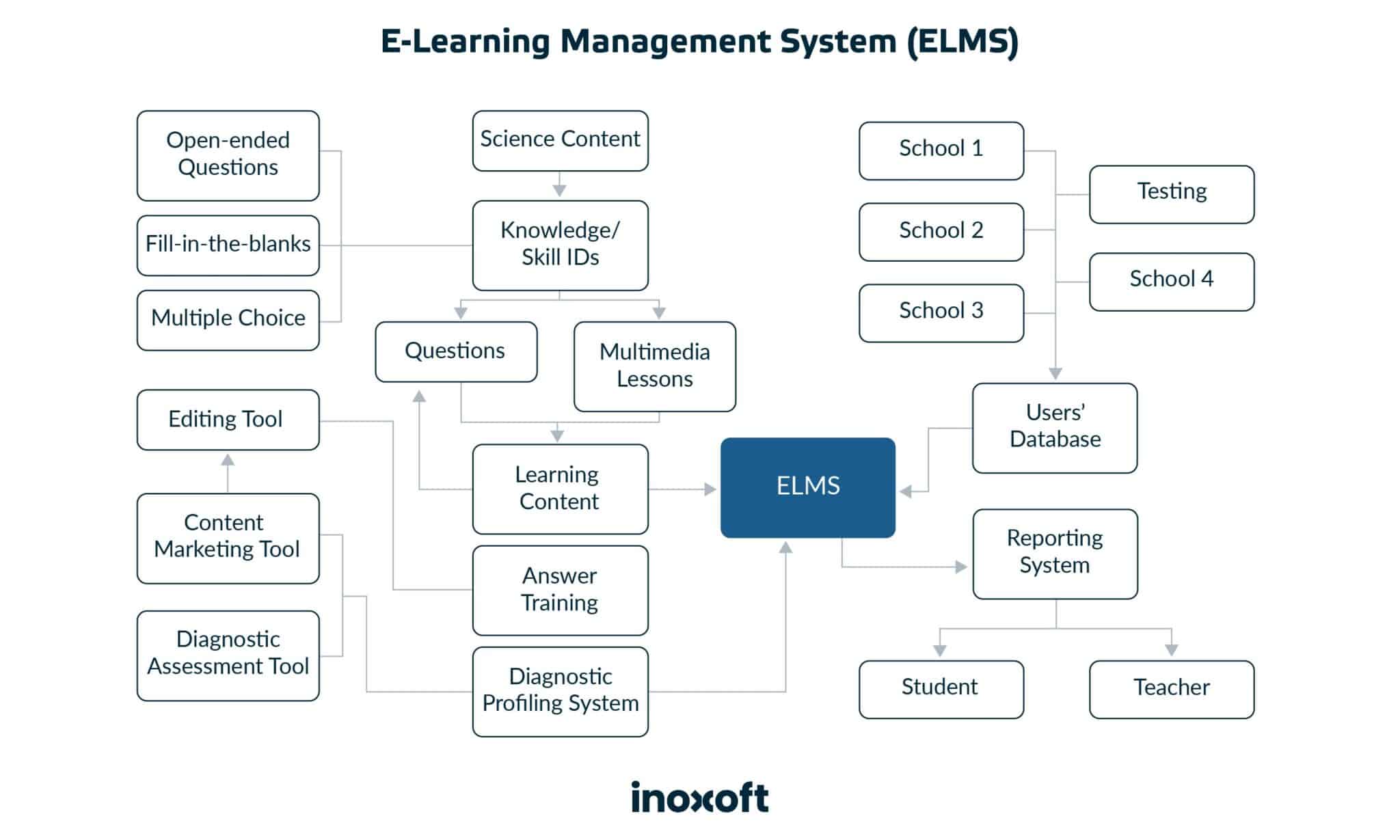
Why do large businesses need an enterprise learning management system (ELMS)? Mainly, to deliver, track, report on and manage training, and learner activity. Also, cover the mundane task of talent onboarding. It may include both single employee training and learning programs within a company. The latter is provided for people inside and outside the organization.
With the help of an enterprise learning management software you can automate your business processes, and adjust the system to employee training needs – i.e. personalize it. Also, it will shorten the learning time, enhance employee productivity and allow you to save up costs.
6 Must-Have Learning Management Systems Features
The importance of enterprise learning management system features depends on the business focus, preferences, and employee needs. Here are the 6 ELMS features to consider. They might apply to one corporation’s requirements, while a little less to the other’s. For example,
1. Reports and analytics
To receive the maximum benefit of a corporate LMS, it is of great importance to track your employees’ progress. Also, the learning initiatives that you offer have to be tracked to understand whether they need adjustments or not. Ask yourself if your employees are
- engaged with the learning content?
- given all the learning information that is required?
You can even set up a timeframe and enter your inbox to receive the valuable analytics there. It will be convenient and insightful!
2. Responsive design
This feature refers to the ability of the LMS layout to adjust to the preferred device. For instance, some employees enjoy passing training via smartphones/tablets. And, the platform itself should be shrunk but still with an aesthetic and pleasant UI. Don’t forget that the UX has to be as logical and intuitive as the web version’s one. Finally, there’s one more thing to consider here. Your training course material should be also accessible via an offline mode.
3. Intuitive user interface
Too many features have never made the learning app the top functionality preference among employees. Cramped app screens are mostly an aggravating factor. So, it is advisable to offer something simple and intuitive. Ask your employees what makes
- it easy to access training?
- them to experience extra challenges?
The more users can figure out how to navigate the platform on their own the better. Complex steps will only make employees postpone their training and give bad feedback.
4. Support services
LMS support is one of the basic features that should be present in this system per se. Employees might need it in case there will be additional questions. Or users might engage in peer discussions, online tutorials, guidelines, and sheets with tips. But, always consult with your staff first about this option and the level of support they want to get while passing corporate training.
5. eLearning assessment tools
Learning online may have its drawbacks. To identify them, it is advisable to be able to spot any flaws and difficulties. And, there are lots of third-party tools to integrate to be able to assess employee success. Or, consider some built-in custom tools. Anything is possible. Assessment always matters. It is the key to monitoring progress.
6. Gamification features
Maybe, one of the most needed features there are. Why? Today, employees, who are loaded with work, might find it difficult to concentrate on learning. But, with such a smart solution as a platform that will teach you in a form of a game – learning will become easier. And more fun. Gamification has already proven to be the leading feature of any LMS.
Why Should Organizations Consider ELMS? What Are the Benefits?
Having the opportunity to provide additional training to your employees is a big plus for organizations. Employees, who have such a benefit will likely consider working for your enterprise rather than the one, which will only put professional training as a requirement.
By implementing an enterprise learning management system for e-learning, you, as a business, should know that you get such benefits as:

Tracking employee progress in real-time
An enterprise learning management platform can track the progress of any employee as his/her data will be stored within the system. So, if you have any concerns, you can always request this type of analytics about anyone under supervision. It sounds quite reasonable if you have the whole focus group to manage and need to teach them how to work the new way. Or with the new software. Or anything specific to that.
Reducing employee churn rate
What is an employee churn rate? The most common definition sounds like this:
So, based on the definition, with the possibility to enhance employee knowledge more of your workers will be satisfied with your organization, and stay longer. According to the statistics, 3 out of 4 employees leave their workplace voluntarily. This means they look for better working conditions. The other statistical data includes the US-based employee turnover reasons:

Training employees in an extra flexible way
Just think of it. Your enterprise has more than 1000 workers. And you need to train them all at once. Perhaps, you have updated your CMS or CRM. And all these 1000 people have to get used to a new system. How is it possible to train them all at once? Especially, without compromising on training quality? Besides, not every worker can have full access to the software. User roles, you know. But, it might be easy. And quite flexible. With the help of a course in an ELMS. Create it, upload it, and set up the training timeframes. Voila! Your employees are getting all the material and you observe their training progress.
Scaling the LMS with new information
Your ELMS is not just a platform with the existing courses. You can always add new ones per employee request or your organization’s basic learning needs. It depends on the capacity of the system.
Updating and improving employee skills/work quality
The biggest benefit of the enterprise learning management system is that your employees will get a chance to learn, enhance their professional skills, and apply them to work as soon as possible. Your corporate academy will grow and develop together with your staff.
The cost of custom ELMS development will return to you twofold. But you can always get to know what you might need to pay for an enterprise online learning management system using our Inoxoft cost calculator. Then, you might get a look and predict potential revenue.
Custom vs Off-the-shelf Enterprise Learning Management System for e-learning

Truly speaking, custom software has always received more votes than the one existing on the market. And the reasons are major! For example, the off-the-shelf software is a ready-made product you buy for your enterprise. It is
- Accessible
- Cheap
- Easy to install
- With references
But, it will never meet your organization’s need for 100%. It would be great if at least 50% of the platform could cover your goals. Also, it won’t have 24/7 support and personalization. You will have to think about how you can adjust it to your specific processes.
On the contrary, custom software will be:
- Tailor-made (based on your requirements and enterprise needs)
- Owned by you
- Easy to modify and adjust to your company’s needs at 100%
- With a possibility to scale and update
- With 24/7 support and maintenance
To read more about the difference between these types of solutions, click here.
Things to Consider Before Creating an Enterprise LMS
Just before creating an LMS for your enterprise, think about the following questions:

After these questions will get their answers, think about the type of enterprise learning management software you need to deploy. There are the following types on the market:
Open-source LMS
An LMS that is initially free. Also, you might have an access to its codebase as it is open-source. But, the functionality of this ELMS is limited. Additional features are to be paid for. For instance, hosting, support, back-ups, etc. And, the most important thing is that the LMS is free-licensed – with no owner. So, no one will be responsible for its crashes, bugs, and updates.
Proprietary LMS
It is a ready-made product, with updates, constant performance monitoring, 24/7 support, and many more. It is extra reliable and comes with a huge price to pay. But, it is worth it.
Cloud-based LMS
A cloud solution is a great option if you need to scale in the process. Here, you will pay an average price, which will depend on a cloud plan and access to the ELMS from any device. Your virtual classroom may travel with you in your pocket. Besides, cloud solutions are our future.
16 Best Enterprise Learning Management Systems
Let’s overview the existing solutions. These 16 enterprise learning management systems provide seamless and effective learning experiences tailored to the unique needs of large-scale enterprises.
LearnUpon
Pricing:Free Trial, Essential, Premium, Enterprise
Features: AI-powered learning, course creation, training delivery, user management, learner engagement, portals, reporting, integrations & partnerships
Clients: software & technology, retail, business & financial services, nonprofit, construction & manufacturing, training companies, associations
Solutions: employee, customer, partner, and member training and extended enterprise
Platforms: Linux, Mac, Windows
Deployment: mobile application, SaaS/cloud
LearnUpon is an intuitive and feature-rich enterprise learning system that delivers a connected learning experience to employees, partners, and customers. It is quick to set up, allowing companies to launch in as little as one week. The solution provides a reliable and safe environment for customers and learners, complying with certifications like ISO 27001: 2013 and SOC 2.
LearnUpon delivers an easy-to-use and interactive experience for learners. Its automation and integration options simplify training management. Additionally, the platform offers robust reporting capabilities to measure training performance and connect learning insights to your bottom-line impact.
Docebo
Pricing: free trial, subscription
Features: learning management, content creation, content marketplace, learning impact, learning intelligence, embedded learning
Clients: software, financial services, manufacturing, healthcare, government, restaurant & hospitality, tech / IT services, education, retail
Solutions: employee onboarding, compliance training, sales enablement, talent development, customer education, partner enablement, member training
Platforms: Linux, Mac, Windows
Deployment: desktop application, mobile application, SaaS/cloud
Docebo equips enterprises to address diverse learning challenges. For example, engaging their learners, driving business value, simplifying content creation and management, and streamlining workflows. You can effortlessly integrate formal training or social learning into your existing tech infrastructure.
As the pioneering generative AI LMS, Docebo goes beyond mere learning delivery — it fosters innovation and delivers substantial business value. That means you will engage any audience, boosting performance, productivity, and growth. Also, this enterprise learning management system promotes scalability, efficiently responding to increased demands. At the same time, you reduce administrative overhead through AI-powered processes and automated workflows.
360Learning
Pricing: Free Trial, Team, Business
Features: authoring, LMS, LXP (learning experience platform), academies, skill-based learning, AI for L&D (learning and development), integrations
Clients: computer software, information technology and services, mechanical or industrial engineering, professional services, retail
Solutions: collaborative learning, employee onboarding, compliance training, sales enablement, frontline staff, customer training, mobile learning, hybrid learning
Platforms: Linux, Mac, Windows
Deployment: mobile application, SaaS / Cloud
360Learning is a dynamic enterprise learning management platform driven by the principles of collaborative learning. It empowers enterprises to quickly upskill their employees, customers, and partners, all from a single, centralized location. With 360Learning, you will automate mandatory training and compliance programs, reduce administrative burdens, and save valuable time.
The platform reaches learners wherever they are, providing flexibility to complete training on the go through native iOS and Android apps. It simplifies workforce planning by mapping skills within the organization and using AI to deliver relevant training. Additionally, 360Learning fosters collaborative learning through expert-led academies and coaching.
Moodle LMS
Pricing: Free, Free Trial, Subscription
Features: custom themes, accessibility check, multilingual support, mobile learning, grade book, competencies and learning plans, gamification, custom reports, social online learning experience
Clients: education management, K-12, higher education, primary/secondary education, professional training & coaching
Solutions: Moodle LMS, Moodle workplace, Moodle app, MoodleCloud
Platforms: Linux, Mac, Windows
Deployment: mobile application, self-hosted cloud-based, self-hosted system, SaaS/cloud
Moodle LMS is a highly flexible and fully customizable open-source system. It caters to the unique needs of educational institutions, from K-12 classrooms to multi-campus universities. The platform accommodates diverse learning preferences, automates reminders and alerts, and provides access from any browser or device.
Moodle LMS prioritizes accessibility with integrated content accessibility checkers and text-to-speech tools. It supports seamless integration with various tools and systems, making it a versatile choice for educators. And finally, you can freely adapt this open-source software for commercial and non-commercial projects.
Canvas LMS
Pricing: Free Trial, Freemium, Subscription
Features: grade book, course creation, gamification, mobile learning, reports, asynchronous self-paced learning
Clients: K-12, higher education, corporate education
Solutions: Canvas LMS, Canvas catalog, Canvas credentials, Canvas studio
Platforms: Linux, Mac, Windows
Deployment: mobile application, SaaS/cloud
Canvas LMS is an open-source platform that serves as a centralized hub for various educational settings, including online, hybrid, and in-person classrooms. You’ll like its user-friendly interface, fostering a dynamic, two-way exchange of information that elevates the teaching and learning experience.
With over 30 million active users worldwide, Canvas LMS is trusted by educational institutions of all levels, from kindergartens to Ivy League Universities in the United States. As a commercial open-source platform, Canvas LMS maintains a single source code tree while offering two licenses and enterprise-level support.
D2L Brightspace LMS
Pricing: Free Trial, Subscription
Features: intelligent agents, release conditions, course publisher, portfolio, annotations, audio and video feedback
Clients: association, government, higher education, K-12, retail, manufacturing, healthcare, technology & software, non-profit
Solutions: learning, onboarding, customer support, and optimization services
Platforms: Linux, Mac, Windows
Deployment: SaaS/cloud
Brightspace is the leading enterprise learning management system. The platform sets itself apart with its powerful tools, customizable content, and unparalleled service and support. It simplifies complex tasks, facilitating meaningful feedback and mastery-based progression, supporting the unique learning journey of each individual.
With powerful analytics, Brightspace allows for data-driven decision-making. It’s a great opportunity to learn at an individual pace, provide personalized feedback, and transform physical classrooms into high-quality online learning spaces.
Blackboard Learn LMS
Pricing: Subscription
Features: learning management, data & analytics, accessibility, synchronous collaboration & web conferencing, mass notifications
Clients: colleges and universities, government agencies, healthcare, financial services & banking
Solutions: consulting, course design, strategic, analytics, educational, and technical services
Platforms: Linux, Mac, Windows
Deployment: desktop application, mobile application, self-hosted system, SaaS/cloud
Blackboard Learn is a top-notch learning system that helps learners and enterprises succeed. It works well with many other educational tools and is available on mobile devices, so students can learn from anywhere. Teachers use it to create different types of assignments, track the progress, and give personal feedback to students.
Moreover, Blackboard Learn focuses on achieving positive learner outcomes by embedding actionable data and insights directly into student and instructor workflows. With its robust technology and a rich network of partners, the platform empowers educators, administrators, and institutions to create engaging and collaborative instruction.
Absorb
Pricing: Free Trial, Subscription
Features: smart administration, learner engagement, e-commerce, reporting & analytics, content libraries, e-signatures, mobile app, artificial intelligence, performance, integrations
Clients: computer software, financial services, food & beverages, healthcare, IT and services, manufacturing, retail
Solutions: compliance training, learner motivation and productivity, learner upskilling & reskilling, extended enterprise, employee onboarding, employee development, social, sales, mobile, partner, customer, and blended learning
Platforms: Linux, Mac, Windows
Deployment: mobile application, SaaS/cloud
Absorb LMS is a user-friendly, cloud-based enterprise learning management system that makes education easy and efficient for businesses. Supporting interactive learning, superb customer service, and scalability, the platform becomes a powerful tool for organizations of all sizes. It has a user-friendly interface, forward-thinking capabilities, and robust reporting tools.
Learners and administrators can easily navigate the platform, access content effortlessly, and measure the effectiveness of their training programs. Whether you’re training employees, global partners, customers, or selling your own training content, Absorb LMS can meet your needs.
Сloud Academy
Pricing: Free Trial, Small Teams, Enterprise
Features: skill assessment, training plans, skill profiles & analytics, content customization, quizzes & exams, certification, learning paths
Clients: businesses and individuals
Solutions: fundamental learning and advanced scenario training on the multi-cloud, operating between clouds, and beyond
Platforms: Linux, Mac, Windows
Deployment: mobile application, SaaS/cloud
Cloud Academy is a powerful enterprise learning management platform designed to help tech teams learn, practice, and master their skills. It offers tailored training and hands-on labs for cloud computing, DevOps, software development, and advanced technologies (AI/ML, data science, IoT).
The platform’s skill assessments and progress tracking make it easy to measure your team’s expertise and address any skill gaps. It also enables you to create training experiences that align with your enterprise’s unique architecture and policies, ensuring your team is well-prepared for the challenges ahead.
Graphy
Pricing: Free trial, Launch, Rise
Features: website builder, mobile app, marketing tools, chat community, security, Graphy assist, integrated payment gateways, third-party support, advanced sales insights
Clients: education management, eLearning, entertainment
Solutions: courses, webinars, membership, digital products
Platforms: Linux, Mac, Windows
Deployment: desktop application, mobile application, SaaS/cloud
Graphy is an all-in-one platform that empowers a wide range of individuals and organizations to share knowledge and monetize their expertise. With Graphy, you can easily create and sell online courses, webinars, PDFs, and more without requiring coding or design skills. Use a custom domain for your website, integrate third-party apps, utilize a payment gateway, and host up to three live sessions simultaneously.
This enterprise learning management software also offers Graphy Assist, a set of automation tools that can supercharge your business efforts and help you earn up to 10% more effortlessly. These tools include features to drive more traffic with SEO-optimized websites, build trust and create urgency with social proof and offers, and maximize conversions with automated funnels and reminders.
Adobe Learning Manager
Pricing: Free Trial, One-time purchased license, Subscription
Features: administration and integration, analytics and insights, gamification, social learning,
push notifications and alerts, certifications, learning path, AI-powered recommendations,
Clients: computer software, electrical/electronic manufacturing, financial services, information technology and services, retail
Solutions: customer education, sales and partner enablement, franchisee and store training, employee skilling, compliance training
Platforms: Mac, Windows
Deployment: SaaS/cloud
Adobe Learning Manager (formerly Adobe Captivate Prime) is a versatile cloud-based learning platform that effectively manages training across employees, customers, and partners. This system integrates seamlessly into your brand’s websites and apps, offering personalized and on-brand learning experiences.
Adobe Learning Manager encompasses support for the hybrid workplace, AI-driven personalization, and gamified learning. It enables organizations to offer flexible virtual and in-person learning experiences tailored to individual needs. Through machine learning and artificial intelligence, learning paths are customized with relevant recommendations, fostering curiosity and motivation for learners.
Seismic Learning
Pricing:Free Trial, Subscription
Features: activity grading, course creation, customization, enrollment, mobile learning, reports, blended learning
Clients:asset management, banking, healthcare & life sciences, insurance, investment banking, manufacturing, media & advertising, professional services, technology, telecommunications, wealth management
Solutions: sales content management, learning & coaching, buyer engagement, content automation, strategy & planning, enablement intelligence
Platforms: Linux, Mac, Windows
Deployment: desktop application, mobile application, SaaS/cloud
Seismic Learning, formerly known as Lessonly, is a user-friendly cloud-based enterprise learning management solution. It enables customer-facing teams to acquire new skills, reinforce best practices, and do better work.
Seismic Learning offers a unified interface for creating, sharing, and tracking training materials and activities. Customization options allow businesses to incorporate branding, logo, colors, and a personalized URL. Users can craft an array of courses and lessons with various content formats, including text, images, audio, and video.
BrainCert Enterprise
Pricing: Free Trial, Subscription
Features: assessments, blended courses, video conferencing, compliance training, skills development, customer & partner training, real-time collaboration
Clients: healthcare, educational institutions, telecommunication, software, retail, manufacturing, hospitality, oil & gas, aviation, construction
Solutions: courses platform, online testing platform, virtual classroom, content management system
Platforms: Linux, Mac, Windows
Deployment: SaaS/cloud
BrainCert empowers organizations to create a branded training platform that simplifies onboarding, boosts engagement, fosters collaboration, and enhances customer retention. Users can create personalized learning paths and track training results. With dynamic content and real-time collaboration features, BrainCert engages learners and delivers exceptional user experiences.
The enterprise learning management platform is packed with features, offering a robust educational solution. It is highly customizable, allowing users to rebrand the platform with their own logo, domain, look and feel, language, and theme. Moreover, BrainCert’s integrated testing platform supports a wide range of question types and offers secure online assessments for academic, certification, and pre-employment testing.
iSpring
Pricing: Free Trial, Suite, Max, Premium
Features: content management, user management, reporting, performance appraisal, customization, learner portal, integration
Clients: education, retail, automotive, restaurants, healthcare, manufacturing
Solutions: onboarding, compliance, product and sales training, employee performance appraisal, partner and customer training
Platforms: Linux, Mac, Windows
Deployment: mobile application, self-hosted cloud-based, self-hosted system, SaaS/cloud
iSpring Learn is a user-friendly cloud-based LMS designed for corporate training. It provides essential features and additional components at a reasonable price. Users can sign up, upload training materials, and assign courses. Whether content employs existing materials or iSpring’s authoring toolkit, the platform offers flexibility in its creation and delivery.
iSpring Learn caters to various corporate training needs and supports 360-degree performance appraisals. With it, you will easily identify employee strengths, areas for improvement, and their suitability for specific roles.
TalentLMS
Pricing: Free Trial, Freemium, Subscription
Features: content creation and management, course creation and management, user management and authentication, assessments, customization, reporting and tracking, gamification, social media, collaboration, e-commerce
Clients: financial services, manufacturing, healthcare, software, consulting, retail, food & beverage, non-profit, automotive, supply chain, real estate, hospitality, telecommunications, aviation, construction
Solutions: employee, onboarding, sales, and customer training
Platforms: Linux, Mac, Windows
Deployment: mobile application, SaaS/cloud
TalentLMS is a user-friendly learning management system that offers a simple and enjoyable learning experience. With it, you can be sure that everyone in your organization, from C-level executives to employees, embraces training. The platform also provides customization options to make the learning process relevant to users.
TalentLMS serves various training scenarios. It is commonly used for onboarding new employees, whether in-house or remotely, as well as for compliance training, product training, and skills development. Also, you can utilize the platform to train external audiences such as customers and partners.
Cypher Learning
Pricing: Free trial, Subscription
Features: content development and delivery, UX/UI & customization, automation & gamification, skills development, e-commerce, assessment & evaluation, reports & analytics,
human connection, integrations & standards, administration
Clients: training organizations, K-12, higher education, financial institutions, publishers, healthcare, content creators
Solutions: extended enterprise, customer and partner training, onboarding, employee training, personalized skills development, career development, mentorship and coaching, diversity and inclusion training, compliance, product and sales training
Platforms: Linux, Mac, Windows
Deployment: mobile application, self-hosted cloud-based, SaaS/cloud
Cypher Learning is a pioneering force in reshaping learning platforms to unlock human potential by offering contemporary and boundless learning experiences. The platform is designed to provide individuals, whether in business or academia, more time to teach and learn, fostering human connections in the learning process.
This enterprise learning management software boasts user-friendliness, exquisite design, and AI-driven technology. It eliminates the complexities of traditional systems, offering a unified approach to content development, delivery, and learning experiences. The system allows users to enhance the learning experience, achieve measurable results, and reduce the burden on their resources.
Consider Inoxoft Your Trusted Partner in Education Software Development
Inoxoft is an enterprise learning management system development provider. We have been accumulating our experience in the education industry for more than 7 years already. And, our skilled team understands all the latest trends, audience preferences, and the usual goals any learner wants to meet.
If you need a learning content management system software or consider an educational mobile app development, get in touch with Inoxoft. Why us? Because we:
- Help create equality in education
- Help instructors with course management and organization
- Provide opportunities to access educational courses globally
- Streamline effective teaching with the help of automatization
- Attract potential learners via user-friendly UI/UX
- Track educational trends like gamification, remote learning, personalization
- Implement all the latest innovations in the industry
Become a course guru with the top software on the market. Ask Inoxoft to give you a hand with that. Contact our experts to receive a consultation on your future educational platform. Don’t hesitate, it takes courage to become a great market leader. And, our team is here to prove your idea is worth building!
Final Thoughts
An extended enterprise learning management system is a useful tool for any organization with a large number of employees. So, you need to approach ELMS development carefully. But, most importantly, do you need one? What features will cover your company’s basic needs? If you are lucky to answer these questions, you can start building an LMS. Be focused on your employees’ goals to meet. And become a successful employer with an ELMS that will automate and advance your business processes as well as employee knowledge.


Frequently Asked Questions
What is an enterprise learning management system?
It is a full-featured learning management system that includes features and capabilities of both a Web portal and a content management system.
What are the major components of a ELMS?
- Reporting and analytics
- Responsive design
- Intuitive UI/UX
- Support
- Gamification
- Assessment tools
How to integrate an ELMS correctly?
To make an ELMS your biggest asset in an organization, make it customizable, personalizable, and scalable. And, of course, your ELMS integration is based on your corporate needs.