
Understanding mobile app development stages at least theoretically helps you set the right expectation for your team, be prepared in advance for certain discussions, and know why this or that phase is critical.
The article is about the stages of mobile app development. And, the most common mobile development platforms are Android and iOS. The process includes the start of the project to the final point when a team releases their product to you. The article will be useful for those who are interested in software projects and want to know more about software development to operate business terms and be on the same wave with managers, engineers in the business world.



- Understanding Agile Approach
- What are the Application Development Stages?
- 1. Project Initiation
- 2. Requirements Analysis
- 3. Focus on Planning
- 4. Prototyping and Design
- 5. Development
- What does acceptance criteria have to do with app development?
- 6. Development and Testing with Scrum
- What are sprints?
- 7. Deployment and Maintenance
- Consider Inoxoft Your Trusted Partner
- Final Thoughts
Understanding Agile Approach
Mobile apps can not be done at once because there is a technique called project management — a wise way to split the stages of building an app into steps and control everything to be sure of the quality of final results. Fortunately, Agile development or Agile project management came into being and did wonders to software development teams.
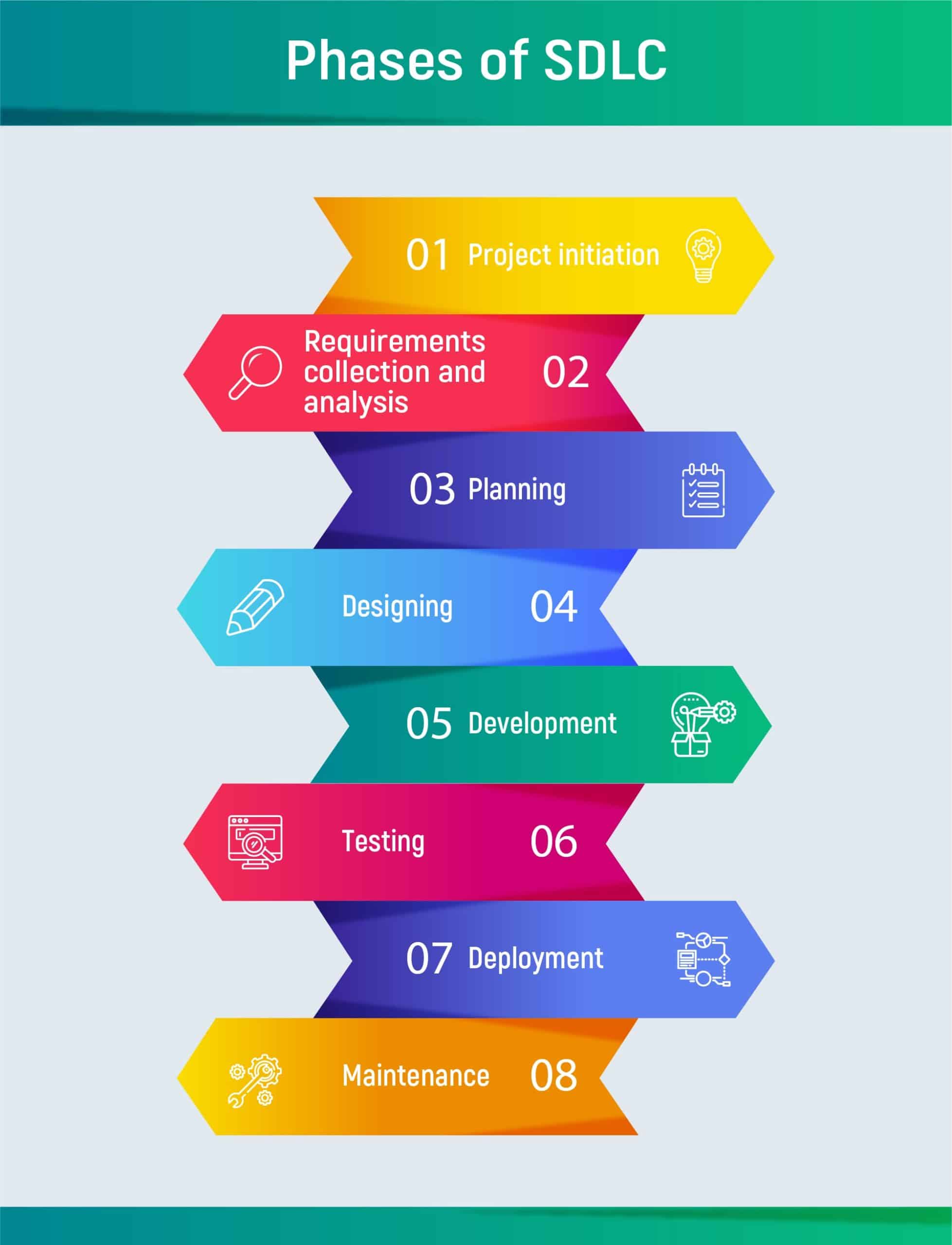
Agile is known as one of the methodologies of SDLC (Software development life cycle), which is a consequence of phases from the project start to its end. Each phase is a collection of activities, completion of which guarantees exact deliverables. Agile’s key concept is to ensure agility and flexibility especially in projects with frequently changing requirements. This method of project management is based on iterative delivery and incremental approach. If choosing Agile, you’ll be led by such key principles in the implementation of mobile app development steps:
- Individuals and interactions over processes
- Working software over constant work on documentation
- Customer collaboration over contract negotiations
- Responding to change over following an always steady plan
Key stakeholders in Agile:
- Product Owner
- Development Team
- Project Manager
- Project Sponsors
Other methodologies of SDLC include:
- Continuous Integration
- Incremental Development
- Rapid Application development
- Spiral development
- Waterfall development
What are the stages of app development? How many stages of developing an app are there?


What are the Application Development Stages?
Key stages in app development that can be met in Agile and other methodologies of SDLC include the next steps: project initiation, requirements collection, and analysis, planning, designing, development, testing, deployment, maintenance.
Build a video chat app with Inoxoft!
1. Project Initiation
If you look at the whole project, there is always project ideation at the beginning, requirements analysis, or Discovery phase. As soon as a client comes with a request to a company, he or she presents the engagement manager with the business needs, objectives, and vision of the product. In fact, if the concept of the project is vague and needs estimation of target audience and market trends, ensuring its helpfulness for end-users, estimating costs and time, and refining requirements, then a client can choose Discovery phase service.
A picture of the project should be consistent for the expert team to conduct requirements specifications and agrees on improvements with a client (if there are some).
2. Requirements Analysis
Requirements analysis should be done professionally and ensure that you’ve learned end users’ needs, and they clearly match users’ expectations. We can classify requirements from high-level to detailed that correspond to business requirements, user requirements, and then system requirements that are the most important. The last is what the system does, how well the system performs, and whether it suits user goals and user point of view. Then, after analyzing all the requirements, it is vital to perform project estimation. I.e. timeline, costs, efficient workforce number, resources we need to use, and many more.
3. Focus on Planning
Among risks customers and teams are afraid of are missing features and deadlines, rebuilds, overworks, constant clarifications, frequent changes in requirements, and uncontrollable budget. We can eliminate all of it if such mobile app development phases as estimating and planning are done reasonably.
What are the app development costs in the UK?
Estimating and Planning is not just in scheduling product deadlines. It should not give an exact answer to how much time the team will spend on the product. Estimation and planning are always incremental and give a team a feeling of flexibility they could use later (if it is impossible to say the exact date of product release at once).
Planning increases project success by providing insights to project risks.
A project plan has more important functions. The team evaluates features, resources, and schedules and finds the best solution for the question “What should we build?”. Good stages of development and planning always go along with:
- Reducing risks
- Avoiding uncertainty
- Better decision making
- Establishing trust
- Conveying information
The team estimates the costs and the benefits. Should we hire one more software engineer to have this feature done in the release? Should we move the release to October but have a better product with these new features? You can plan the release for September, but change requests happen and the release can shift to October.
It is the same as finding optimal solutions currently, but not thinking your plan is 100% ideal or putting all your efforts into planning rather than on development. Planning should concern the planning of activities and tasks, not planning features. And it is also good for looking for forgotten activities. After we plan and estimate everything, it is crucial to make a first sketch of the future app to see how it feels.
Hire mobile application developers to deploy a top-notch market solution!
4. Prototyping and Design

Discover how to create an educational app!
Prototyping in mobile application development phases is a fast way to draw out the first design sketches for your app. It should direct to a common vision with a customer over how the app will feel and what iterations there would be. After UI/UX designer can draw the design of the app incorporating the best transitions, animations, and styles to make the app feel smooth in using and convenient for navigation, and have an intuitive interface. After UI/UX designers have made a solid prototype and mapped the user flow, it is time to drop the UI part to production. In other words, coding.
Learn more on how to create a location-based app design now!
5. Development
The application development process is not mere coding. Every client wants the app to be made on time. The majority of software development teams use backlog – a storehouse of tasks. It is always important to know in advance how much there is to do and how much time development can take. That’s why, prior to development, there is always prioritization and estimation of tasks. The most critical tasks at the moment are the most prioritized ones to go into the estimation stage. Estimation helps the team define the time they need to close the task. This time takes into account only pure coding and excludes meetings, discussions and other time spent on development during the project.
Development is done with the technology stack that we define at the beginning of the project. Software engineers work side by side with UI/UX designers and quality assurance engineers. Together with a project manager the team will have regular meetings with a client and report on a daily or weekly basis depending on approaches and models of cooperation the company offers.
How to make a schedule app?
What does acceptance criteria have to do with app development?
Development is always done according to AC. So, what is the importance of acceptance criteria? Acceptance criteria are requirements that a product must meet. They are approved prior to development. Requirements Manager or QA prepares AC that includes features explanation and can also include design mock-up: “As a System Admin, I can go to the Clients list, click on the Import button, so that upload clients to organizations chosen from a drop-down list”.
Acceptance Criteria are written by QA engineers and mean a detailed and technical explanation of a feature for example: as a user, I should be able to create that. Acceptance criteria later turn into user stories. Product owners decide on the prioritization of tasks, approve Acceptance Criteria and check the job done.
See what are the iOS app development requirements today!
6. Development and Testing with Scrum
In Agile methodology, Scrum is the framework. That splits agile app stages are into iterations – one, two, or three-week periods sprints. Scrum helps software teams avoid scattered work that lasts for months and does not ensure necessary results. Scrum is ideal for projects with changing requirements, so the ones that need high flexibility from the team, fast updating, and reaction to changes. If you work with scrum teams, you will certainly have invitations regular meetings for iteration cycle planning, daily status updates, and sprint reviews.
The basic idea of Scrum is to create a safe and change-free environment to enable a team to concentrate on the planned development tasks. The team plans out a sprint of typically two weeks and the idea is that they work uninterrupted during this period. This process really helps to get things done. It avoids the “new = important” trap where everyone thinks that this new idea is much more important than the one they came up with a month ago.
The performance of the project depends on the competency of the team as well as on the right prioritization, expectation management, and on-time releases. Struggle over insufficiencies in project management, intuitively chosen tasks for prioritization, never-ending iterations, and more have begun to wane. Software engineers, designers, and testers often use Jira (or other software) boards to see their sprints and backlog. We can categorize Jira tasks in a way like this:
- To do
- In progress
- Ready to deploy
- Ready to test
- Done
QA engineer moves the task to Done or In progress. Deployment of ready code written by engineers happens firstly in the QA environment which is testing the environment for the app.
QA engineers test the developed functionality and if necessary, software engineers polish everything to reach total excellence and ensure the feature works according to acceptance criteria in a bug-free way.
What are sprints?
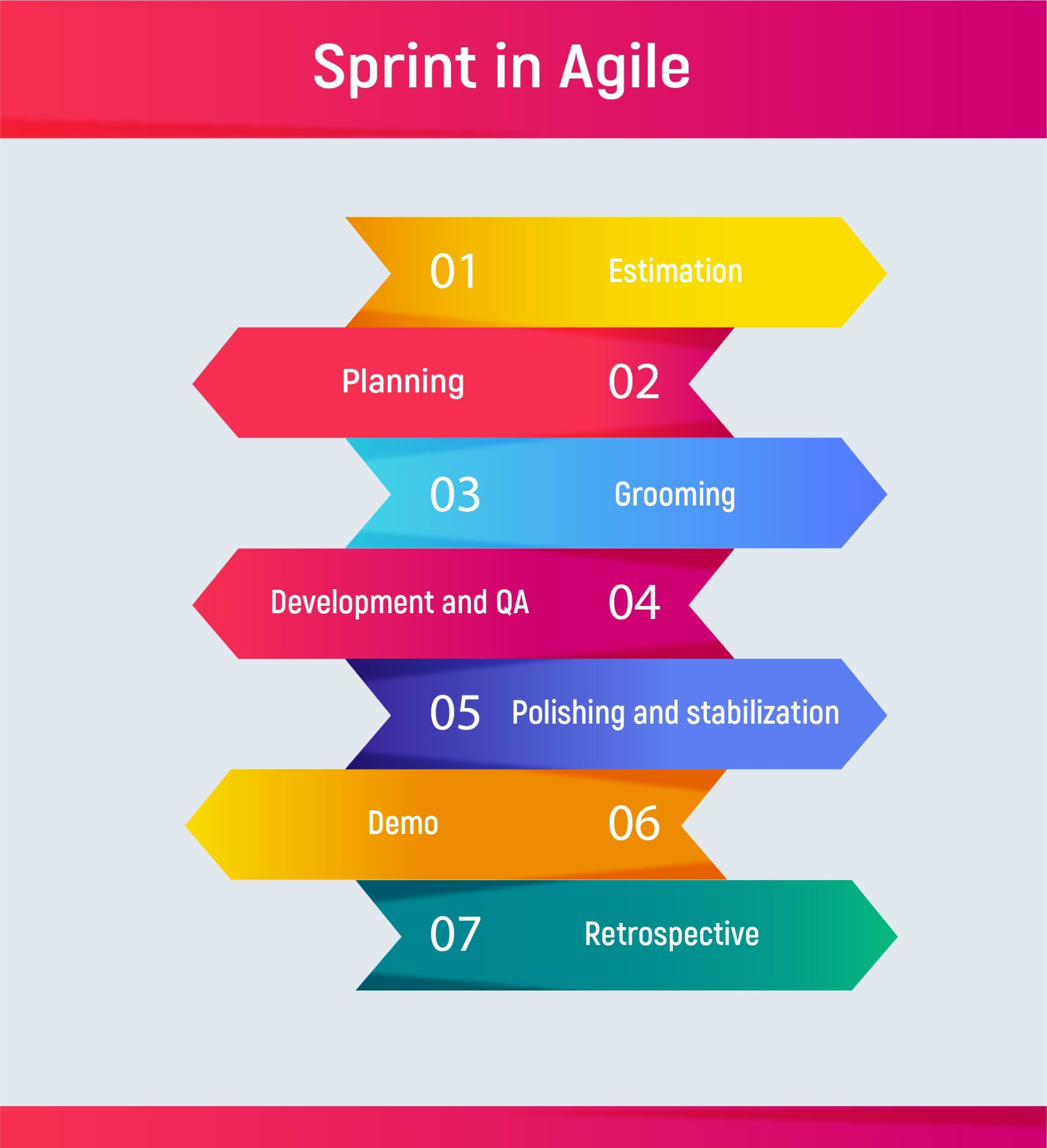
So, what will the sprint look like? Following Scrum, the issue to solve, which consists of certain small tasks to implement, will be a sprint for 1-3 weeks. Thus, firstly project managers with engineers decide what tasks from backlog are the first to implement. They shift to estimating how much time will be spent on tasks in a sprint. Then they pull the issue from the backlog to Jira indicating the estimated time for it, its status, epic link, and responsible person. Then, software engineers can start building the code.
Discover more about regression testing in agile development!
The team can have a grooming stage which is to review the backlog and ensure prioritized issues are ready for the next sprint. They need grooming sessions to clarify all things so that client’s needs are known and there are no unexpected change requests. Change Request can be done only within the next sprint and when client has approved it. Only if an urgent need, then we can substitute tasks in the sprint. Sprint lasts for one to three weeks. Each sprint ends with a releasable increment visible to a product owner.
Are sprints included in the KPIs for developers’ measurement?
7. Deployment and Maintenance
When software testing is over, the code is clear and no bugs remain, the application can be pushed for final release into the environment where customers can find and use it. The software development team checks the deployment process to eliminate possible issues. When the system is deployed, software companies provide further maintenance of their product and ensure:
- Bug fixing
- Code refining
- Enhancements
Phases of app development are milestones of successful project implementation. One of the most effective approaches is Agile which focuses on executing activities, meeting clients’ needs and requirements, and maintaining flexibility in a team, but not focusing on reporting, paperwork, and constant planning that does not bring results.
Consider Inoxoft Your Trusted Partner
Inoxoft is a mobile development company creating software according to the seven phases of application development. Among the mobile application development services we provide there are:
and many more!
Contact Inoxoft experts and receive the best mobile application development services. Our developers will:
- implement solutions only according to your requirements
- pay attention to your vision and all details
- carry out all ideas and meet deadlines 100%
- use the most effective and fast technologies
- provide you with a comprehensive consultation
- offer you a Discovery Phase service
We know perfectly the mobile app monetization strategies and with our help, you will:
- boost your brand’s reputation
- effectively manage the development process
- increase your business’s visibility
- increase user trust in your services
- have analytic data in your hands
- improve customer experience
- reach better marketing and get higher revenue
Need a sports app? See what Inoxoft can build for you in our sports tracking application development case study!
Final Thoughts
Every company has its own development processes with mobile application development stages. It greatly depends on the organization, its size, and best productivity practices. At Inoxoft, we rely on the 7 standard mobile application development steps. They help us set the correct goals, be on the same page with the team, and respond quickly to any changes. Also, get to know more in the article “Hire an app developer cost“.
Find out more about top app development companies in the USA!
Frequently Asked Questions
What are the mobile application development stages?
- Project initiation
- Requirements analysis
- Focus on planning
- Prototyping and Design
- Development
- Development and Testing with Scrum - achieve more at less time
- Deployment and maintenance
What is the Agile approach to mobile development?
Agile is known as one of the methodologies of SDLC (Software development life cycle), which is a consequence of phases from the project start to its end. Each phase is a collection of activities, completion of which guarantees exact deliverables. Agile’s key concept is to ensure agility and flexibility especially in projects with frequently changing requirements.
Why should there be mobile app development steps?
Theoretical and practical understanding of the stages of application development can help set the right expectation for your team, be prepared in advance for certain discussions, and know why this or that step is critical for your product development.