
Can something as mundane as inventory management be exciting and innovative? It sure can—while also offering lucrative opportunities. As internet connectivity and e-commerce spending skyrocket, the businesses turn digital in terms of dealing with their stock. That’s why inventory management software market size exceeded USD 3 billion in 2022. Twice as much is expected in 2032. Let’s look closely at how technologies impact supply chain management.
In today's consumer-driven market, building an inventory management system can help you a lot. For instance, to keep track of all your inventory, eliminate overhead costs and any streamlining in the modular chain, and concentrate on tasks essential for business expansion. With the inventory management software, the all-in-one inventory store is integrated.
This inventory management software development guide will explain to you the latest inventory management trends, the benefits of using it, its key features, and its types. We will describe how to build inventory management software in steps and introduce Inoxoft, an international software development company, and certified partner that builds market-leading inventory management software.



- What Is Inventory Management Software?
- Market Statistics of Inventory Management Software
- Benefits of Using Inventory Management Software
- Accuracy and efficiency
- Cost reductions
- Data visibility and planning improvements
- Eliminating stockouts and overstocks
- Enhanced customer service
- Reduced Mistakes and Discrepancies
- Key Features of Inventory Management Software
- Inventory management and tracking
- Barcode scanning integration
- Purchasing and order fulfillment
- Customer relationship management (CRM)
- Inventory notifications
- Types of Inventory Management Software
- Periodic inventory management
- Perpetual inventory management
- Just-in-time inventory management
- ABC inventory management
- 4 Inventory Management Trends
-
Widespread adoption of digital mobility
-
Improving inventory management with AI and Machine Learning
- Using computer vision-enabled technologies
- Enhancing supply chain management with blockchain
- How to Build an Inventory Management Software in 6 Steps
- Developing conceptual model
- Defining business goals
- Design and development
- Testing
- Deployment
- Maintenance
- Tech Stack for Inventory Management Software
- Inventory Management Software Development Cost
- Number of features
- Features' type and complexity
- Development team location
- Development hours
- Software design
- Long-term support and maintenance
- Third-party integrations
- Consider Inoxoft Your Trusted Partner
What Is Inventory Management Software?
Inventory Management Software is a technological tool designed to track and manage the movement of goods within an organization’s various locations, such as warehouses, retail stores, manufacturing hubs, and depots.
It is essential to monitor and control every aspect of inventory management, from production and warehousing to shipping and retail. This software allows businesses to keep a close eye on the movement of their stock, ensuring that they can efficiently manage their inventory levels, sales, orders, and deliveries.
The primary goal to build inventory management system is to provide real-time, accurate information about inventory status. It ensures that every commodity unit is traceable and integrated into the system, minimizing the risk of stockouts or overstocking, which can adversely affect a company’s profitability and sales cycle.


Market Statistics of Inventory Management Software
The inventory management software development market is a dynamic and rapidly growing sector pivotal in modern supply chain management.
According to Statista, the supply chain management software market will reach an impressive $20.27 billion by the end of 2024. It reflects a high demand for software solutions that enhance supply chain and inventory management processes.
This market expects a sustained CAGR (Compound Annual Growth Rate) of 4.5% between 2024 and 2028, emphasizing a continued expansion and adoption of this software.
Inventory management software is estimated to represent 25% of the global warehouse management system market, underscoring its significance within warehouse operations and logistics.
Furthermore, we can anticipate significant market developments in various countries:
- In Germany, the valuation of inventory management software is projected to increase from $0.12 billion in 2022 to $0.28 billion by 2030, showcasing a notable CAGR of 5.8%.
- China’s inventory management software market might grow substantially, ascending from $0.18 billion in 2022 to $0.29 billion by 2030, marking an impressive CAGR of 6.4%.
- India’s inventory management software market is poised for expansion, with its value growing from $0.15 billion in 2022 to $0.23 billion in 2030, reflecting a CAGR of 6%.
Benefits of Using Inventory Management Software
Pushing inventory is one of the major obstacles a business owner faces when building their brand. Implementing inventory management software is beneficial for your company. Let’s look at why the development of inventory management software is advantageous.
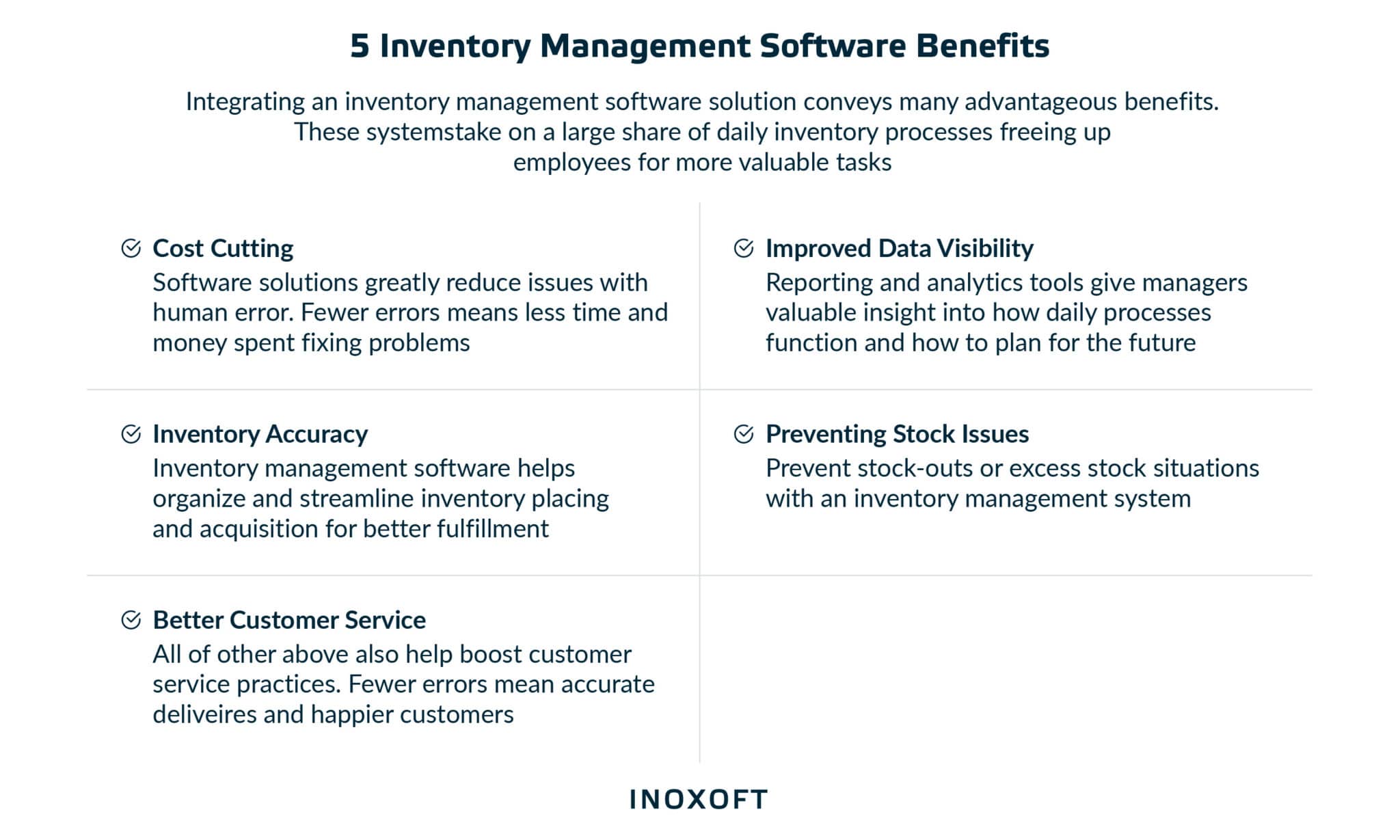
Accuracy and efficiency
Many companies lack accuracy, which leads to business damages caused by an incorrect order. Software for inventory management helps retain less inventory on hand while increasing order accuracy. You enjoy the robust capabilities of inventory management and the advantages it offers to stay flexible and reduce inventory. As a result, your ROI for your system will increase.
Cost reductions
Fewer errors imply less time and money spent on damage control. Inventory management also reduces the cost of holding unused things. The critical items are programmed to renew automatically as the system determines the right quantity of specific products. This frees up space for a wider selection of goods and reduces the cost of keeping inventory on hand.

Automating your inventory management procedures can also help you save a lot of time and money. If robotics and AI are appropriately utilized, fewer hands will be required to pick, pack, and prepare things for shipment.
Data visibility and planning improvements
It’s essential to keep business intelligence in mind while evaluating the advantages of implementing an inventory management strategy internally. Companies can build up their data assets to more thoroughly examine what’s happening within the firm by using bar code scanning, other BI tools, and a single data warehouse.
Eliminating stockouts and overstocks
Inventory managers face a daily challenge: maintaining correctly balanced inventory levels. Both overstocks and stockouts cause damage to businesses. Fortunately, reasonable inventory control may intervene and stop these unpleasant situations from disrupting the supply chain as a whole. A system will automatically set up to re-order, automatically buying more items when levels reach a specific quantity.
Enhanced customer service
Happy customers mean positive reviews and reordering. Additionally, when you precisely and promptly complete customers’ orders, you will develop a reputable brand in the industry. Inventory management aims to improve and assist in elevating you in the eyes of your clients. With an efficient solution, your customers will appreciate you more thank to the tools an inventory management system offers.
Reduced Mistakes and Discrepancies
While humans are prone to errors and mistakes, software and machines excel at accuracy. Inventory management applications play a pivotal role in averting fundamental errors related to calculations, updates, alerts, and more, thereby elevating the overall efficiency of the supply chain.
Key Features of Inventory Management Software
How to develop inventory management software with efficient functionality? The features of inventory management software may vary depending on the product requirements and business goals. This section will list five must-have functionalities every inventory management software should include.

Inventory management and tracking

Staff members in charge of inventory management should know exactly what products are in stock and where they are housed in the warehouses. This feature is the key to effective inventory control. Your inventory management software must provide you with real-time, comprehensive visibility into the most critical supply chain management elements to avoid running out of stock, set automatic reorders, and receive stock updates.
Barcode scanning integration

Barcode scanning is the most used method to count inventories. Businesses can take advantage of incorporating barcode software to increase accuracy and speed, which considerably saves costs. It can streamline and automate the entire inventory tracking process, including stocktaking and stock organization.
Purchasing and order fulfillment

When a purchase order is made, inventory management software automatically updates the inventory. These features allow you to get partial orders, keep track of backorders, and monitor low stock. You can automate the entire procedure from order creation to fulfillment for all your sales channels.
Customer relationship management (CRM)

A CRM aids in the secure storage of client information so that you can access their purchase history and preference information to forecast future behavior.
- Keep an order history.
- Create personalized advertising and rewards.
- Set the default address and customize the tax rates.
- Adjust a price book for each pricing strategy.
Inventory notifications

Inventory alerts are triggered by a number of modules, which decrease waste, improve inventory financials, and control customer expectations. These features include automated email or SMS alerts that inform you when inventory levels are low, shipments are running behind schedule, or the supply chain is disrupted. Inventory alerts provide additional operational control for supplier management, material planning, shipment logistics, and sales forecasting.
Types of Inventory Management Software
When discussing how to build an inventory management system, it is vital to understand what types of inventory management exist. In this section, we will discuss four types of inventory management:
- Periodic inventory management
- Perpetual inventory management
- Just-in-time inventory management
- ABC inventory management
Periodic inventory management
Periodic inventory systems allow businesses to know the starting and ending inventory levels over a specific period rather than tracking inventory daily. Physical inventory counts are used in these inventory control systems to track stocks. The remaining money in the purchasing account transfers to the inventory account after the physical inventory is finished. It is then modified to reflect the cost of the concluding inventory.
Organizations can decide whether to use “Last-In, First-Out” (LIFO), “First-In, First-Out” (FIFO), or another inventory accounting method to determine the cost of ending inventory; just bear in mind that beginning inventory is the ending inventory from the prior quarter.
Perpetual inventory management
A perpetual inventory system keeps track of additions and subtractions as inventory goods are acquired, sold from stock, relocated from one location to another, chosen from inventory, and discarded. Some businesses use perpetual inventory systems because they provide accurate inventory data and can manage fewer physical inventory counts.
Because they consistently produce accurate results when adequately managed, perpetual inventory systems are also favored for inventory tracking. This kind of inventory control system performs best when used with warehouse inventory, a database of stock levels and bin locations continuously updated by warehouse personnel using barcode scanners.
Just-in-time inventory management
Just-in-time (JIT) is a type of inventory management that calls for close coordination with suppliers to ensure that raw materials arrive at the exact time when manufacturing is supposed to start, but no earlier. Efficiency improvement and waste elimination are the objectives. Since quality rather than the lowest price is frequently the primary goal, JIT requires long-term agreements with dependable suppliers.
ABC inventory management
Using the ABC analysis inventory management technique, inventory items are valued according to their importance to the company. “Class A” items are the most significant stock-keeping units (SKUs), followed by Class B and Class C. Thank to the ABC inventory management approach, executives can better grasp which goods or services are essential to the financial performance of their company.
4 Inventory Management Trends
Supply chain disruptions force virtually all companies to review their inventory management systems, looking for more sophisticated and efficient ways to maintain property inventory levels across industries. When building an inventory management software, you need to consider the latest trends in the industry. The four most well-liked trends in inventory management are listed below.
Widespread adoption of digital mobility
The inventory management software web development has been significantly impacted by the mainstreaming of digital mobility. According to Deloitte, the future of mobility is frictionless, automated, personalized travel on demand. Mobile inventory management can help businesses complete orders more quickly, keep smaller inventories at lower costs, and reduce the time products spend on warehouse shelves without running the risk of not having what the client needs when they ask for it.
Improving inventory management with AI and Machine Learning
Maintaining massive amounts of data is the most exciting challenge facing a store. With the aid of AI and ML, you may now track all the required data simultaneously using scanners & sensors, Stock Keeping Unit (SKU) formats, etc. In 2022, over a third of supply chain industry executives widely used AI in their organizations.
Through an inventory management app, such information is always accessible and straightforward to view. In particular, ML is mainly used to identify faulty goods or packaging, which helps increase client trust in an online brand.
Using computer vision-enabled technologies
The global computer vision market size is projected to reach $41.11 billion by 2030, growing with a CAGR of 16.0 percent. Stockouts, overstocks, lost inventory, and human errors—you can mitigate all these risks with computer vision-enabled software for tracking product availability.
When creating an inventory management system, consider integrating computer vision-enabled technologies. It gives the advantage of streamlining the delivery of real-time insights to maintain high levels of client satisfaction and increase productivity by reducing time consuming manual labor.
Enhancing supply chain management with blockchain
Blockchain-based inventory management can drastically minimize the imbalances and inefficiencies that manufacturers encounter. The share of supply chain leaders planning to invest in blockchain is 40 percent. The use of blockchain in asset management enables businesses to connect every link in their supply chain and create a secure, transparent, and permanent record of all transactions. It helps inventory management teams to transition from reactive to proactive management.
How to Build an Inventory Management Software in 6 Steps
The scope of inventory operations that the solution should address determines the timeframe and methodology for developing the inventory system. How to develop an inventory management system step-by-step? The typical steps we follow at Inoxoft to implement reliable inventory software are outlined below.
Developing conceptual model
Conceptualization begins with identifying the functional areas involved in your business’s regular operations that are simple to track with data. Then, we consider how other companies in your sector have already employed such software to increase productivity. Finally, we determine the areas where your operations could profit from automation and then build the perfect solution based on your requirements and unique issues.
Defining business goals
Are you going to use an IMS as a component of your broader e-commerce strategy, or do you want to develop inventory management software to help you efficiently get new goods stored and distributed to customers? At the start of the process, you should clearly state your key goals and company objectives. We will help you clarify the particular use cases and attempt to live up to the expectations.
Design and development
Once you’ve outlined your software requirements, it’s time to begin the design and development process. Identify the tools and technologies to use for your solution, and determine specific designs and workflows. Tasks are divided based on the development approach, and the product can be finished by the specified deadline.
Testing
Engineers must test their produced code in addition to writing it to ensure that any bugs or weaknesses are fixed prior to implementation. This step often entails numerous iterations and changes to existing functionality to ensure that the program functions as planned and can be further improved by other developers. A stable product is ready for deployment at the end of this phase.
Deployment
The deployment of an inventory system often includes the following steps:
- Setting up backup and disaster recovery processes for software infrastructure. Deploying the system to one of the selected facilities for a pilot run after installing and fine-tuning any necessary hardware.
- Keeping track of how the system performs in actual use to address potential change requests and problems.
- Making the final iteration of the solution available to all facilities that have been selected.
Maintenance
Typical maintenance tasks include ongoing after-launch user support, scheduled system updates, and functionality expansion in response to changing user needs and corporate requirements, such as enhanced user interface, more inventory report kinds enabled, etc.
At Inoxoft, we have built a customizable inventorization solution for B.O.S. Better Online Solutions, an Israel-based hardware-providing company. We helped our client achieve their business goals by enhancing inventory management with new functionality, reliability, performance, and support. Our web platform and mobile app allow for conducting inventory management. Users can set up initial inventory processes and then customize them for different types of businesses.
Tech Stack for Inventory Management Software
The technology stack determines inventory management software functionality and performance. You should meticulously select the right technologies and tools to create efficient IMS.
This comprehensive tech stack comprises a versatile set of technologies and tools that can aptly address various aspects of an IMS. Your choice of programming languages and frameworks should align with your inventory management software’s specific requirements and objectives. Simultaneously, your selections of databases and servers should be in harmony with your project’s scalability, performance, and security needs.
Here’s a comprehensive tech stack to understand how to make inventory management software:
|
Programming Languages |
PHP, Python, JavaScript, Ruby |
|
Frameworks |
Symfony, Laravel, Ruby on Rails, Django, Flask |
|
Databases |
MongoDB, MySQL, PostgreSQL |
|
Servers |
Apache HTTP Server, Nginx |
|
Cloud Servers |
DigitalOcean Cloud Services, Linode, Amazon Web Services (AWS), Vultr, Microsoft Azure |
Inventory Management Software Development Cost
Providing a specific price tag for such software is challenging, as various factors determine its overall cost. To better understand them, let’s take a closer look.
Number of features
The extent of features incorporated into your inventory management software directly influences the development cost. A software solution with comprehensive features will typically incur higher development expenses.
Features’ type and complexity
The nature and complexity of the features you require significantly impact the estimated development cost. More intricate and specialized functionalities often translate to a higher price.
Development team location
The geographical location of your development team can substantially affect the cost. Different countries may have varying charges for development services, so it’s essential to consider this when planning your budget. For instance, according to Glassdoor, software development specialists in the United States earn on average $8,500 a month, while their counterparts in Ukraine — around $4,700.
Development hours
The amount of time your development partner requires to create the software plays a critical role in determining the final cost. The longer the development process, the higher the associated costs.
Software design
The specific design elements and user interface you envision for your software also contribute to the overall development cost. A more sophisticated or custom design may come with an additional price tag.
Long-term support and maintenance
If you choose long-term support and maintenance services for your software, you should include these ongoing costs in your budget. Regular maintenance is essential for your inventory management software’s continued functionality and reliability.
Third-party integrations
Any third-party integrations or external services you wish to incorporate into your software will influence the development cost. Integration with external systems or platforms may require extra time and resources.
Consider Inoxoft Your Trusted Partner
Inoxoft is a software development company that, among others, specializes in inventory management software. We have seven years of experience digitalizing and modernizing services for clients worldwide. We develop an inventory management software for safe and improved inventory management, order fulfillment, product data tracking, barcode scanning, and data collection for better performance.
Our software solutions fostered the growth of our clients in the USA, UK, Sweden, Netherlands, Canada, Israel, Germany, and other countries worldwide. We build inventory management software that guarantees stock synchronization, complete visibility, and precise quantity modifications while utilizing barcode scanners to locate supply chain inventory products, assess sales success, and uphold quality assurance.
We have built a customizable solution for global enterprises for our client. With enhanced features, dependability, performance, and support, it assisted them in improving inventory management. Our web platform and mobile app improve inventory management with initial inventory procedures setup and customization for various types of businesses.
Contact us to consult with our expert on custom inventory management software development.
Frequently Asked Questions
Why do businesses need customized inventory management software?
Businesses require customized inventory management software for efficiency, scalability, and competitive advantage. It enhances data security, integration, real-time insights, customer experiences, and cost savings while providing flexibility and agility.
What are the key features to consider when developing inventory management software?
When creating inventory management software, consider essential features that make it efficient, adaptable, and secure. These include real-time inventory tracking, support for barcodes and RFID, managing multiple locations, and handling orders and suppliers.
Additionally, prioritize functionalities like demand forecasting, user access control, reporting and analytics, and automated alerts. Ensure seamless integration with other systems, mobile accessibility, and the ability to handle batch and expiry tracking, serialized inventory, returns, and kitting.
Stock valuation methods, a user-friendly interface, scalability, robust security, and customizability should also be part of your software. Don't forget audit trails, automated reorder points, asset management, localization, and cloud-based options for accessibility and scalability.
How can inventory management software development improve supply chain efficiency?
Inventory management software development enhances supply chain efficiency through real-time visibility, demand forecasting, and streamlined operations. It reduces holding costs, minimizes stockouts, and automates reordering, improving order fulfillment and customer satisfaction.
Integrating with other systems and providing valuable insights optimizes supply chain processes, ensuring efficient and cost-effective operations.
What challenges should I be aware of when implementing inventory management software?
Consider challenges like data accuracy, integration complexity, user training, and initial investment during inventory management development. Also, be aware of change management, security concerns, customization, scalability, vendor support, collaboration with suppliers and customers, data migration, and regulatory compliance.
Planning for these challenges and working closely with your software provider can ensure a successful implementation that enhances your inventory management processes.